AI can be a real time saver when it comes to making quizzes. I’ve used ChatGPT plenty of times to build question banks I can plug right into Gimkit or Quizizz. It’s fast, it’s flexible, and it gets you about 80% of the way there. But if you don’t know a few key things, that other 20% can turn into a mess real quick.
Here’s what I’ve learned along the way…..
1. Feed It the Right Stuff
If you want solid questions, give ChatGPT solid input. Don’t just say “make me 10 questions about Jamestown.” Copy and paste the exact reading, video transcript, or notes your students will be using. That way, every question connects directly to what they’ve seen in class. When you skip this step, you end up with questions from the internet version of your topic, which might not match what you’re teaching at all.
2. Ask for Variety
Be specific: tell ChatGPT you want a mix of DOK 1 (recall) and DOK 2 (basic understanding or application) questions. Otherwise, you’ll get ten versions of “What year was Jamestown founded?” Variety keeps students thinking.
3. Watch Out for Answer Length
AI has a habit of making the correct answer the longest one. Every time. It’s a dead giveaway. Tell it to make all the answer choices about the same length. You’ll still need to double check, but it cuts down on the editing.
4. Distractors Need Love Too
AI struggles with wrong answers, it tends to make them so random or ridiculous that the right answer is obvious. Plan to spend a few minutes tightening up those distractors. Make them believable. You want students thinking, not guessing.
5. Review Everything
Before you upload that quiz into Gimkit or Quizizz, read through every single question. Fix weird wording, inconsistent capitalization, or any question that doesn’t make sense. It’s worth the few minutes, it saves you from the “Wait, that’s not even one of the answers!” moment mid game.
6. Let AI Be the Starter, Not the Finisher
Think of ChatGPT as your quiz assistant. It can do 80% of the grunt work drafting questions, formatting CSVs, building structure. You do the final 20% tweaking for clarity, checking accuracy, and matching your class tone. That combo works way better than either human or AI alone.
AI isn’t replacing teachers, it’s giving us a head start. The trick is knowing how to steer it. Give it the right info, set clear expectations, and finish strong yourself. That’s how you turn a good AI draft into a great classroom quiz.
There are some people you can learn something from every time you talk to them. That was Scott Petri for me. Whether it was during a presentation, a text thread, or a chat about lesson design, he had a way of dropping a sentence or two that would make me rethink what I was doing in my classroom.
He helped me see Social Studies through a different lens. Less about just covering content, more about treating it like literacy instruction. That idea that we’re not just teaching history but also building background knowledge, academic vocabulary, and real writing skills, still shapes how I teach today.
Here are some of the biggest things that stuck with me….
Social Studies is English
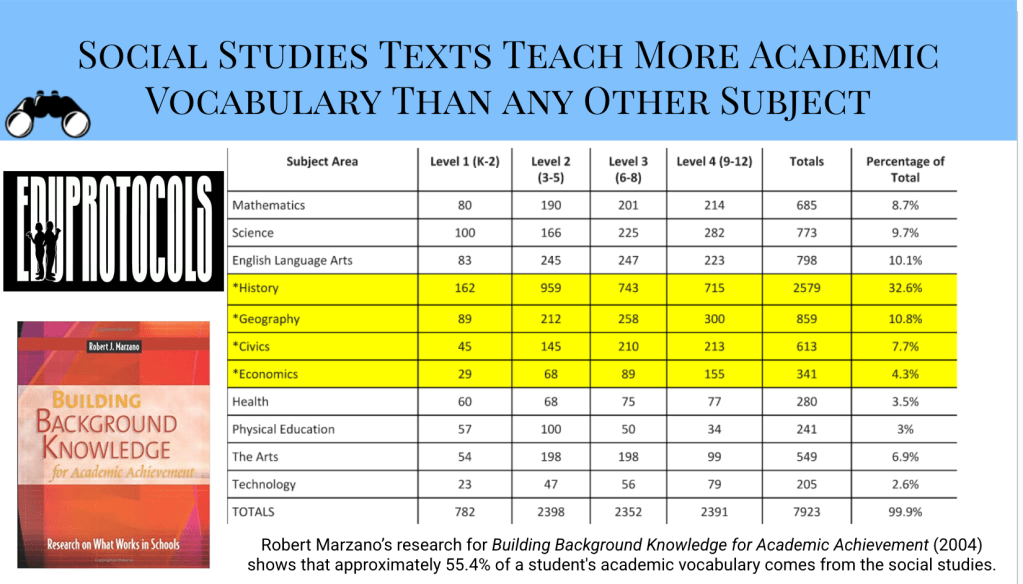
Scott used to say he was a “closeted English teacher.” He wasn’t just throwing that line out, he meant that if we’re teaching history well, we’re also teaching kids to read better, write better, and talk about complex ideas. One stat he shared really changed how I viewed my role: 55% of a student’s academic vocabulary comes from Social Studies. That’s massive. It made me way more intentional about teaching words and concepts instead of assuming kids would just “pick them up.” When I treat Social Studies like an English class, my students grow more in both.
Listening Is Learning
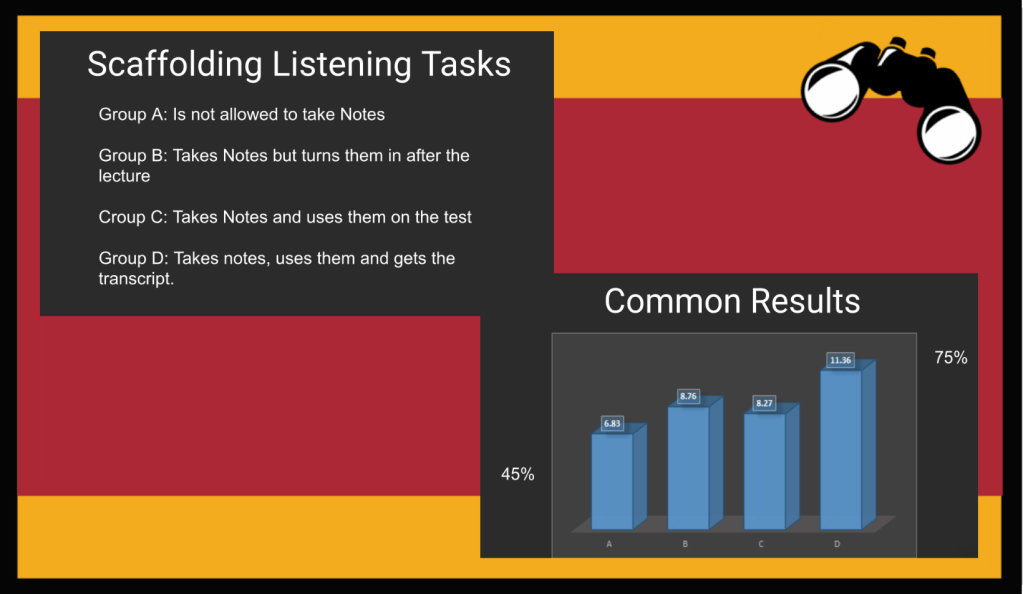
Scott taught me that students can listen and understand two to three grade levels above where they can read. That fact gave me a huge mindset shift. I used to feel a little guilty when I read texts aloud or used podcasts or narrated videos. It felt like I was doing too much of the work. But this past year, when I was doing a lot of reading aloud to my class, I remembered what he said. I wasn’t just talking at them, I was helping them access content they wouldn’t be able to get on their own.
Letting students listen, follow along with a transcript, and take notes isn’t cutting corners, it’s smart scaffolding. It helps them build confidence and fluency without feeling lost. Multimodal input: reading, listening, writing works better than just throwing a hard article at a struggling reader. That’s something I leaned into more this year, and it paid off.
Connections Are Where the Learning Happens
Scott shared a stat in most of his presentations that came from the 2021 AP U.S. History exam: only 15% of students could successfully make historical connections. We’re pretty good at helping students recall facts. But making connections? That takes practice—and modeling.
Scott was always pushing us to slow down and help students ask questions like, “How does this relate to what we’ve already learned?” or “What’s the bigger theme here?” And this is exactly why he created the Archetype Four Square: a powerful tool that helps kids organize historical events into meaningful patterns and themes. It’s a simple structure that forces them to think about how ideas evolve, connect, and repeat across time. It’s one of the most practical ways I’ve seen to build true historical thinking skills.
Reflection Isn’t a Side Dish—It’s the Main Course
Another big takeaway from Scott was the way he used student reflection and exemplars. Not as an extra. As a core part of the learning. Whether it was a Cybersandwich or a Number Mania or a Retell in Rhyme, he modeled how to show students what good looks like, and then helped them figure out how to get there.
After a Cybersandwich, I’d show students the notes I wish they had written. After a Number Mania, we’d reflect: “Did these numbers tell a story or just fill a slide?” That kind of thinking has changed how I run my classroom. It’s not just about doing the activity. It’s about growing through the feedback loop……..
Final
I still catch myself quoting things I heard Scott say in a Zoom call or presentation. Little ideas that stuck with me and ended up changing how I teach. He helped me raise the bar, not by making things harder, but by helping me teach smarter.
If you’ve ever wondered if those small moments of professional learning matter trust me, they do. They ripple. They stay with you. And sometimes they become the foundation of how you teach moving forward.
“Not sure if I should say good morning or good night as it is 1:40am. We were talking about school and you came up in the conversation. I wanted to thank you for making learning easier and enjoyable.”
That was the email. No subject line. No assignment attached. Just a student, up late, thinking, and choosing to send a thank you. I didn’t need anything more.
These kinds of messages hit different. They’re not about test scores. They’re not about grades. They’re about how the learning felt.
And let’s be honest: that phrase: ‘easier and enjoyable’ didn’t come from thin air. It came from structure. From intentional repetition. From low cognitive load with high cognitive payoff. It came from EduProtocols.
I get messages like this often. Not every now and then. Often. Kids will tell me in class or write a note after the year ends. They’ll say things like:
“I actually liked coming to your class.”
“We learned but it wasn’t stressful.”
“It felt like we were doing something different every day, but I could always keep up.”
“We actually create things in your class.”
That’s not magic. That’s the outcome of running Fast & Curious consistently. That’s what happens when we build Thin Slides into weekly routines. That’s what Thick Slides and Sketch & Tell allow for talking, processing, seeing, and remembering.
Students feel the difference when we stop overloading them and start giving them rhythm. EduProtocols create a culture where thinking becomes normal. Where success doesn’t depend on who finished the worksheet, but who was brave enough to share a thought.
And because of that rhythm, because they know what to expect, students actually engage. They don’t need every direction reexplained. They don’t need to ask, “What are we doing today?” Every protocol becomes a stepping stone toward learning how to learn.
It’s easy to think EduProtocols are just about efficiency. About lesson planning made easier. But they’re also about connection. They shift the cognitive load to students without turning school into a grind. They open the door for late night thank you emails that aren’t about content, but about feeling seen and capable.
That email wasn’t just a thank you. It was proof. Proof that EduProtocols aren’t just changing the workflow – they’re changing how students experience school.
In the past I have been asked, “How do you decide which EduProtocols to use, and how do you stack them together?”
On the surface, a rack and stacked lesson looks like it just works. Kids are engaged and the transitions are smooth. But there’s a lot of planning behind that flow. Decisions that start long before the first Gimkit or Frayer Model ever hits the board.
It’s not just about which EduProtocols I like. It’s about what kind of thinking the content demands, and what kind of thinking I want students to practice.
Start with the End in Mind
Every lesson starts with one question: What should students know or be able to do by the end of this?
For Manifest Destiny, I wanted students to understand the concept and controversy of the idea—why people believed in it, what it looked like, and how it’s viewed today. They needed to analyze both visual and written sources and make comparisons between historical and modern perspectives.
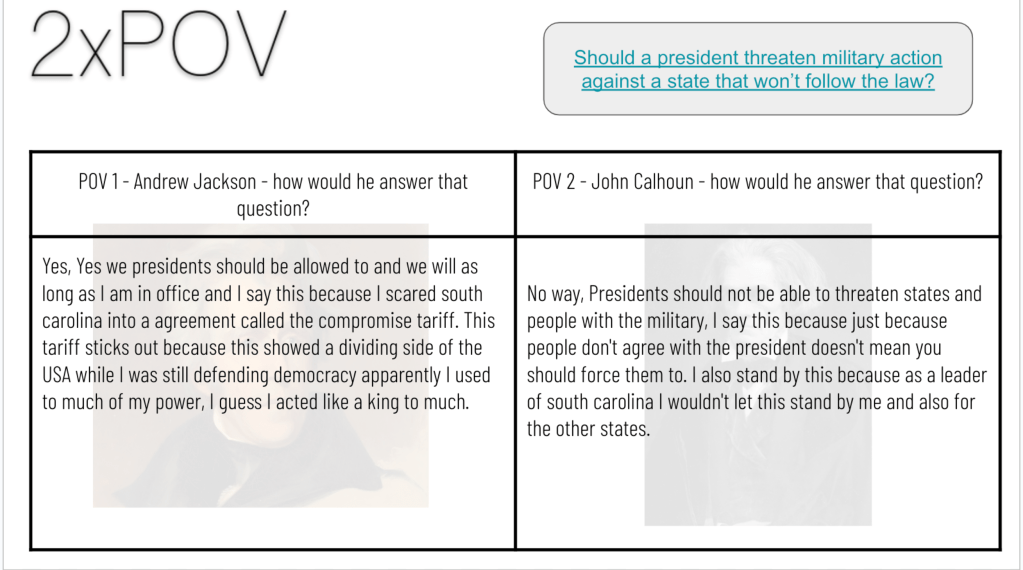
For the Nullification Crisis, the goal was to understand how tariffs sparked tension between state and federal power, and to analyze Jackson’s leadership through that conflict. This wasn’t about memorizing dates—it was about understanding motivations, perspectives, and consequences.
The learning targets were content-specific, but they were rooted in bigger historical thinking skills: sourcing, analyzing POV, sequencing causes and effects, and making comparisons.
Build the Stack Around Thinking, Not Just Activities
Here’s where the rack and stack comes in. I don’t start with a random list of EduProtocols. I think about how the brain learns (I’ll fully admit, no clue if these terms are correct, but it’s how I think about them):
That learning arc helps me organize the protocols in a way that makes sense.
My coauthor Scott Petri would always stack (sequence) EduProtocols in a way to help students create something/express themselves at the end of a lesson. An example of this is his use of Fast and Curious and Thin Slides throughout a lesson that would build to the Thin Slides being used for an Ignite Talk.
Manifest Destiny Stack
Fast & Curious: Vocabulary primer to retrieve key terms
Wicked Hydra: Generate questions from a controversial headline to spark curiosity
Sourcing Parts: Analyze the “American Progress” painting to tackle symbolism and sourcing
MiniReport: Synthesize a textbook excerpt and a modern article into a structured comparison
Nullification Crisis Stack
Fast & Curious: Start again with vocabulary retrieval
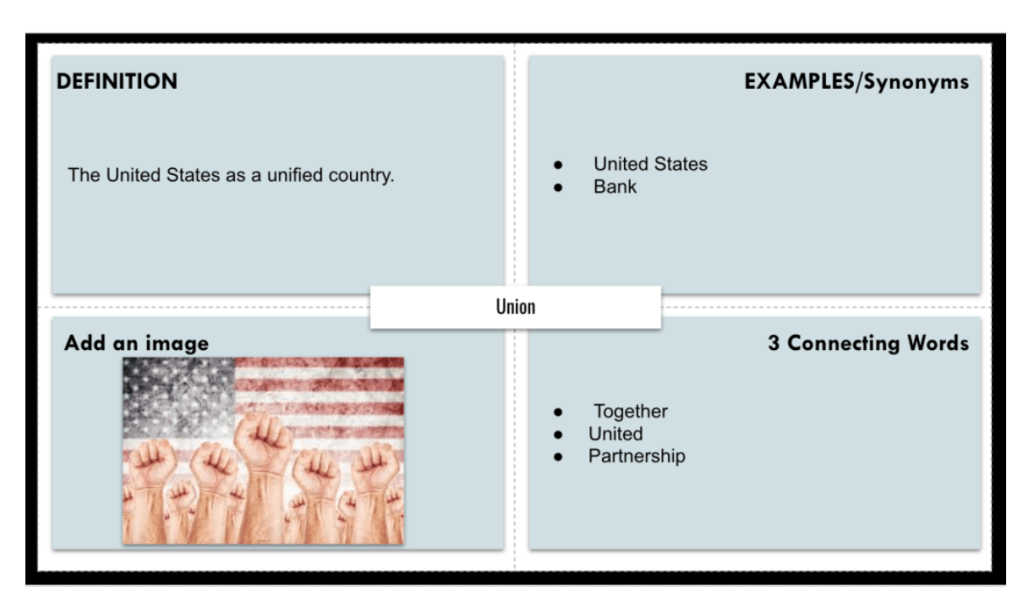
Frayer Model: Use student data to target the most-missed terms for clarity and fluency
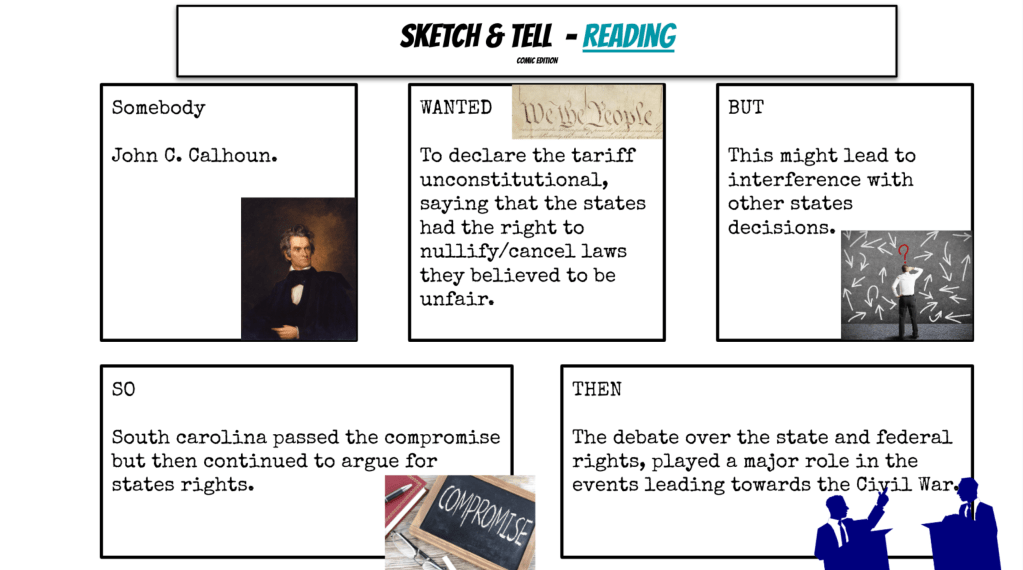
Somebody-Wanted-But-So-Then: Sequence the conflict with a narrative lens
2xPOV: Explore Jackson vs. Calhoun’s stances through primary source excerpts
The protocols change, but the pattern doesn’t. Start with retrieval, build into context and complexity, and finish with a chance for students to show their creativity/knowledge.
Let the Content Shape the Thinking
The thinking flow stays the same, but I adapt it based on what the content demands.
Manifest Destiny is full of imagery, myth, and legacy. It asks students to wrestle with beliefs, intentions, and consequences. I use EduProtocols that bring those pieced to life through visuals, structured writing, and modern-day connections.
The Nullification Crisis, on the other hand, is rooted in power dynamics and constitutional interpretation. It’s about understanding who wanted what, why they clashed, and how it played out. So I lean into story structure and POV work to help students break it down.
I’m not asking, “Which protocols do I like?” I’m asking, “What kind of thinking does this content require?”
Some Skills Go Beyond the Content
There’s another layer here, too. Sometimes it’s not just about history skills, it’s about cognitive skills that matter long after students leave the classroom. I’m trying to take care of the present while preparing kids for the future.
Here are three skills I intentionally built into these stacks:
Adopting a Different Perspective: The POV Analysis protocol pushed students to consider two very different interpretations of the same conflict: Jackson and Calhoun’s views on states’ rights and federal authority. That’s more than a history lesson. That’s about being able to hold multiple perspectives in tension, something we all need more practice with in and out of school.
Synthesizing Messages: In the Manifest Destiny lesson, the MiniReport asked students to combine ideas from a traditional textbook and a more critical, modern article. They had to make sense of competing viewpoints and turn it into a coherent written product. That’s the kind of synthesis skill that transfers to writing, speaking, and decision making.
Asking the Right Questions: Wicked Hydra helped students generate their own questions from a provocative headline. We didn’t start with answers – we started with curiosity. That habit of inquiry matters. It helps students know what to ask when things get unclear or when they need to dig deeper, whether it’s in history or real life.
Final Thoughts
When I rack and stack, I’m not just filling time or tossing in a protocol because it’s fun. I’m designing a flow. A lesson that moves students from buiulding background knowledge/retrieval to confident creation – without burning them out along the way.
Even though the topics change, the thinking stays consistent:
Start with the goal
Build the sequence that supports the right kind of thinking
Keep the cognitive load manageable
Let students do the heavy lifting, at the right time, with the right support
If you’re just getting into racking and stacking, here’s my best advice:
Start small. Pay attention to the thinking each step requires. And when in doubt, ask: What do I want students to do with their brain next? That’s the question that drives everything I build.
After years of using EduProtocols, I’ve learned that a few always rise to the top, especially in a year with content to cover, AI to manage, and routines to maintain. These three protocols: Fast and Curious, Number Mania, and Thick Slides became the top 3 EduProtocols I used this year.
It set the tone for class, gave us quick retrieval, and got vocab into students’ brains before they needed to use it in a deeper task. I stuck with Quizizz most days and kept the sets short, tight, and tied directly to our content theme. Played it twice: once cold, once after a fast reteach or class discussion. Bonus if the class average hit our target, they earned 100% in the grade book.
How I used it:
Previewed key terms for units on Colonization, Constitution, Expansion, Industrialization, and Civil War
Included terms like mercantilism, urbanization, checks and balances, sectionalism
Built student buy-in by letting them submit terms to include
Used it mid-lesson when attention dipped or as a quick Friday review
Turned Quizizz class averages into a challenge: beat your Monday score by Friday
Fast and Curious Tip:
You can easily find premade quizzes on Gimkit or Quizizz – simple, easy, ready to go. However, I don’t often do that because they are not worded in a way that I teach or word things. So, I will often take the textbook section of readiongs for the week and upload those to ChatGPT. I have ChatGPT extract vocabulary words and create questions that fit with the content.
Number Mania
This protocol moved from a go to graphic organizer to one of the most powerful thinking routines I used all year.
At first, it was just about identifying meaningful numbers. But it quickly became the tool that helped students back up their claims with evidence, especially when layered into short writing tasks or argument structures.
How I used it:
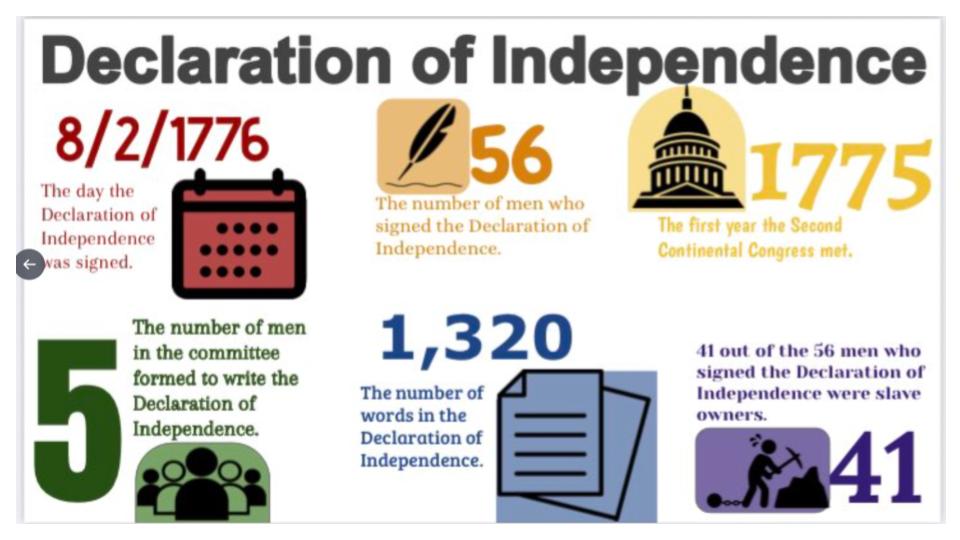
After short readings on Jamestown survival rates, Revolutionary War casualties, Constitutional compromises, factory wages, and Civil War production
Students pulled 3 – 4 key numbers, paraphrased them, and explained their significance
Paired with icons, AI generated visuals, or short captions
Rolled right into Short Answer responses or “Divide the Pie” arguments
Posted top examples to Padlet and used them as models
The extension that worked best: I started requiring students to use two of their numbers in a Short Answer claim. For example: “Why was the North better positioned to win the Civil War?” They had to cite the railroad mileage, factory output, or population numbers they had just worked with. The writing was better because the thinking was already done.
Bonus variation: AI generated “Truth with Sprinkles” – I gave them a fake paragraph with incorrect numbers, and they had to fix it using their Number Mania notes. Quick, smart, and fun.
Thick Slides
This became my go to for synthesis and creative output.
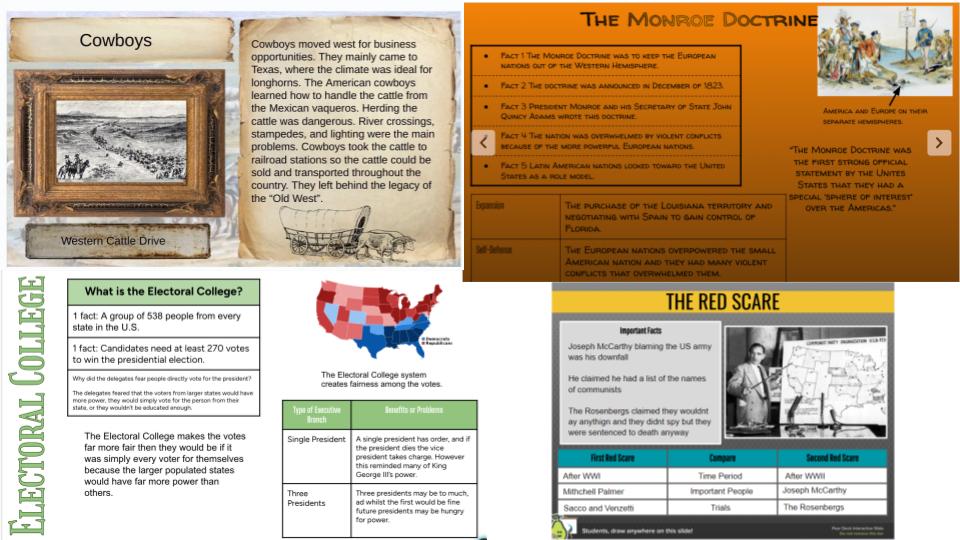
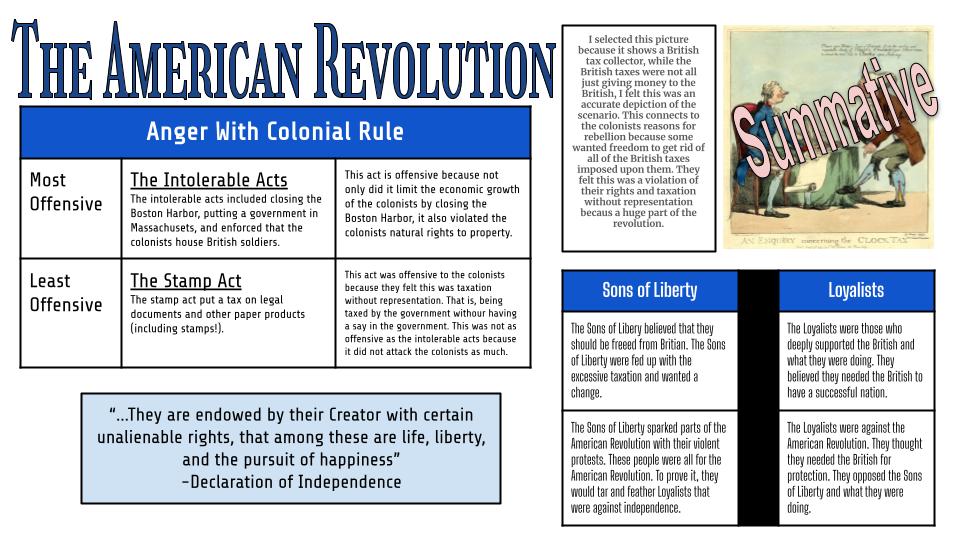
Students got one slide to make their thinking visual. We used a set structure title, visuals, stat or quote, short summary and it let me see quickly who got the content and who needed help.
How I used it:
Wrapped up content from Colonial Regions, American Revolution, Industrialization, Reform Movements, and Civil War
Assigned AI image generation to visualize abstract concepts or quotes
Had students screenshot their slide and upload it to MagicSchool for feedback
Turned slides into gallery walks or Padlet posts to compare perspectives
The best variation this year: After students created their slide, I had them use it in a Divide the Pie activity. Each student argued which reformer, event, or region had the biggest impact—using only the details from their slide. It forced them to know what they made and defend it.
Final Thought
These three: Fast and Curious, Number Mania, and Thick Slides did more than fill time. They became a rhythm. Retrieval led to analysis. Analysis led to argument. Argument led to creative synthesis. They worked with any unit, played well with AI, and kept students focused.
Let me know if you want copies of my Number Mania prompts, Thick Slide templates, or how I stack these across a full week. Always happy to share.
A kid once turned in an answer to question 3 that just said: “Answers will vary.” It was clearly Googled and lifted from a teacher Weebly page of TCI answer keys.
I looked at it, shook my head, and said, “If you’re going to cheat, at least cheat correctly.” Then I realized the question I asked didn’t require them to think – it just needed Google… or now, from AI.
We’re in a world where students can Google or AI their way through any worksheet. So instead of harder questions, or. ore questions, we need better ones. Questions that actually require students to think, reflect, and decide.
Here’s how I’ve started reworking my questions:
Old Question
Better Version
What caused the American Revolution?
If you were a colonist, which British action would’ve pushed you to rebel—and why?
What did the Great Compromise do?
Which Constitutional compromise matters most today? Defend your choice.
What is Manifest Destiny?
Would you have supported Manifest Destiny in the 1840s? Explain your POV.
What were working conditions like?
Create a pro-factory ad. Then explain what you left out—and why.
What’s federalism?
Draw a symbol of federalism. Explain how it shows two governments sharing power.
These shifts help because AI can explain the facts, but it can’t choose for the student. When students have to justify, reflect, or take a position, it brings their voice into the work. AI might help them brainstorm, but it can’t replace their thinking.
Add Simple Reflection
Asking better questions helps, but building in quick metacognition takes it further. Here are 3 go-to prompts I use:
“What was the hardest part of this task—and how did you deal with it?”
“What part of your answer are you most confident in?”
“What changed your thinking today?”
Nothing over the top, just 1–2 sentences. We do it after Sketch & Tell-o, Thick Slides, Number Mania, or a writing task. It keeps the focus on how they thought, not just what they said.
Focus on the Process
During our Industrialization unit, I gave students a fake, rosy paragraph about factory life. Instead of writing something new, I had them revise it using evidence from our Number Mania activity (factory rules, fines, wages, etc.). The magic happened in the follow up: “What did you change—and why?”
That’s where I got real thinking. Students weren’t just reporting facts. They were spotting spin, making decisions, and defending edits. That’s process.
Final Thought
If a chatbot can do the assignment better than your students, it’s time to change the assignment. Ask questions that need them. Build in time to reflect on the how, not just the what. Focus less on “finishing” and more on thinking out loud.
And when you start making these shifts, it’s eye-opening to see how much students have been relying on Google or AI to get by. The shortcuts get exposed, but so does the opportunity to help them become real thinkers.
There’s a growing perception in classrooms that when feedback or grading comes from AI, it feels less human. Students sometimes see it as impersonal, maybe a sign that the teacher doesn’t care. And to be honest? That feeling isn’t entirely wrong.
Part of good feedback is relationship. The tone, the nuance, the “I see you” moments that students pick up on when a teacher scribbles a star or writes “Nice!” in the margin. AI doesn’t do that. It can’t. So when students say it feels different, we should listen.
But here’s the other side of the story: AI feedback doesn’t have to replace the human part. AI can free us up to be more human. Instead of spending hours hand-marking spelling errors or rewriting the same comment over and over, teachers can let AI handle the routine, and then use class time for real conversations: mini-conferences, revision chats, side-by-side re-reads.
Some ways to make AI feel more human in your feedback loop:
Let students co-pilot: Have them ask AI for feedback and critique the response. Was it accurate? Helpful? What would they change?
Add a human layer: Record a short audio note responding to AI’s comments or add a sticky note that says “This is solid, especially that last sentence!”
Use AI as the start, not the end: “Here’s what the AI noticed, now let’s talk about what I noticed.”
In the end, AI can feel less human. But when we use it alongside teacher insight, not instead of it, it can lead to more feedback, more revision, and more meaningful learning.
Maybe it’s not about choosing between care and AI, it’s about using AI to create more space for care.
Sometimes, teaching history means peeling back the layers. Literally.
It was late in the year, and I just wanted to mix things up. We’d been hitting heavy content, and I needed something different—not easier, just… different.
So I asked AI to help.
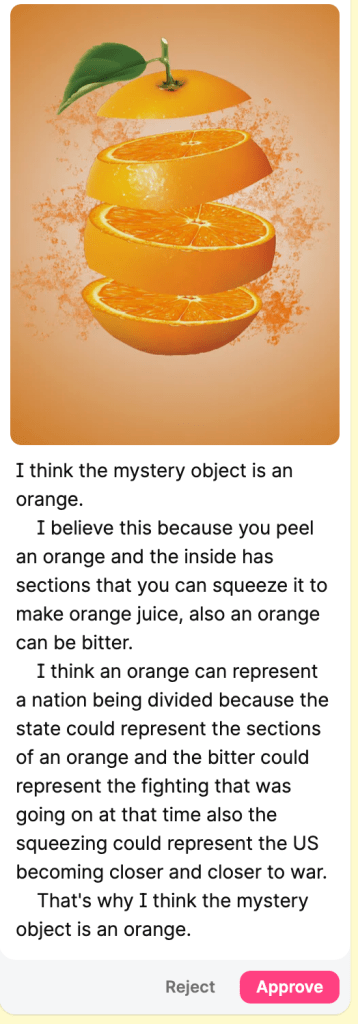
We were covering the Lincoln-Douglas debates—a pivotal moment tied to the expansion of slavery and the rise of the Republican Party. I pasted a section of our textbook into ChatGPT and gave it a twist: “Rewrite this reading. Keep all the key facts. But embed five subtle clues to an object: an orange. Don’t name it. Just hide it.”
The clues?
wedge
sections
bitter
peel
squeeze
But here’s the thing—I didn’t tell the students that. I left the rewritten passage with the sub, followed by the usual reading questions. No mention of any mystery. No hint that something fun was coming.
Only after they answered the questions did I drop the surprise: A Padlet link with the challenge. “Based on the clues in the reading, what mystery object do you think I was thinking of? Add your guess. Then explain how it connects to a country being pulled apart by the issue of slavery.”
To make it more interesting—and to avoid copycat answers—I changed the Padlet settings to manual approval. No one could see each other’s guesses.
And just like that, reading became a puzzle. The guesses poured in: a violin? a broken flag? a lemon zest? And then came the ones that nailed it: an orange.
Their follow-up explanations were exactly what I hoped for:
“The country was in wedges, pulling away from the center.”
“There were different sections that couldn’t stay together.”
“Once you peel it, you can’t undo it.”
“Everyone was getting squeezed from both sides.”
That day, the students didn’t just complete another textbook reading. They investigated. They connected. They created a metaphor.
Why This Works: This isn’t fluff. It’s curiosity-driven, metaphor-based reading that builds real skills. Here’s the breakdown:
Choose a reading worth understanding deeply.
Pick an everyday object that metaphorically fits the moment.
Use AI to embed 4–6 subtle clues.
Let students read and respond as usual.
Then drop the mystery object twist: guess and explain the metaphor.
It turns reading into a mystery. It turns metaphor into meaning. It turns a late-year lesson into something different because we all need that during this time of year.
The first time a student told me, “This sounds smart, but I don’t think it’s right,” in response to an AI-generated answer—I knew we were onto something.
That moment sparked Fray-I—a thinking routine I’ve been developing to help students analyze AI responses, not just accept them. It’s still a work in progress, but it’s already changing how my students interact with both history and technology.
Here’s the flow:
Students engage with content – a primary source, textbook excerpt, or short video.
They ask a question based on the reading or viewing—either one they create or one I provide (especially if the source leaves something unanswered or unclear).
They run that question through an AI tool like ChatGPT or MagicSchool.
They get a response and analyze/evaluate.
Here’s what Fray-I looks like:
Claim: What is the AI saying? What’s the main idea or argument?
Evidence Used: What support, facts, or examples does it include?
What’s Missing?: What voices, perspectives, or key historical context are left out?
Push It Further: How could this answer be stronger? More accurate? More complete? Would you use this response?
This turns AI into the text—not the shortcut. Students question the bot like they would a biased newspaper article, a government document, or a historical speech.
Why Fray-I works:
It puts students in the driver’s seat. They’re not copying—they’re critiquing.
It reinforces essential social studies skills: sourcing, bias, perspective, and evidence-based reasoning.
It meets students where they are—working with the tools they’re already curious about.
And honestly? The engagement is different. When students start noticing what the AI got wrong, what it ignored, or how it could be improved, they feel ownership.
Fray-I isn’t finished. I’m still tweaking sentence starters and scaffolds to support all learners. But it’s already doing what I hoped: Helping students think like historians in a world where information is instant—but not always insightful.
In 2006, when I first started teaching tennis, I ran a bunch of classes for 3 to 5 year olds. We had all the right equipment—mini nets, low-compression balls, small racquets—the stuff that actually made sense for little kids. But I was still running drills like we were using regular tennis balls on a full court – stuff that was way too big and too much for where they were.
One day, my boss—who also happened to be a great mentor—watched one of the classes and asked, “Why don’t you have these kids rally?”
I kind of shrugged and said, “They’re not ready for that. They’ll struggle. What are they going to get out of it?”
To which he replied, “Maybe this week they get one ball in a row. Maybe next week they hit two. Maybe the week after that, none. But you’re giving them a chance. You’re giving them the opportunity to build the skill.”
That moment stuck with me for years. Recently, it’s been popping into my head again. Not for tennis. Rather, because of AI.
When AI tools first started popping up in education, I wasn’t sure what to think. I didn’t want it to become a shortcut. I didn’t want kids to stop thinking. I didn’t want to lose the craft of teaching and learning.
That conversation about rallying stayed with me. I realized—maybe AI is the ball. Maybe we just need to let kids rally.
Now I’m using tools like Magic School, Class Companion, and Snorkl in class. Not just for the sake of using them, but to give students opportunities.
Let them try. Let them fail. Let them get one good idea this week, maybe two next week.
Class Companion gives them real feedback on their writing—feedback they actually use. Snorkl lets them explore thinking with AI scaffolds. Magic School helps them dig deeper and ask better questions. These tools aren’t doing the work for them—they’re helping them build skills.
But here’s the key: we still have to be the coach.
We’ve got to teach them how to interact with AI, not just copy and paste. We’ve got to help them ask better questions, process feedback, revise, and think. That’s what AI literacy is really about.
So no—AI isn’t perfect. But if we avoid it because we think kids can’t handle it… we’re missing the whole point.
They can’t rally if we never give them the ball.
Let them rally. Stand on the sideline. Feed them another one. That’s how they grow.









 Moler's Musings