
Why Traditional Tests?

4 days ago, as I was beginning to discuss a final project for our Constitution Unit, and a student said, “You don’t give tests. This class is awesome.” I replied with 3 words, “I hate tests.” In the moment, I wish I would have said more, but my heart took over as I muttered those 3 words. But 4 days has allowed me to use my head to craft a better response in this post…..Why do I hate tests?

I am known for having a good memory. However, my earliest memories are foggy or nonexistent. Any memory I can conjure up is connected to how it made me feel. The following memory I’m about to share created a negative feeling.

My junior year of high school, I took the ACT on a Saturday morning. I was at a local high school in a plain classroom, barren walls, and wooden desks arranged in rows. It was a struggle for me…….the words, the questions, the numbers……..everything was a struggle. It gave me this hopeless feeling. Time was up, I hopelessly handed in my test, and spent the next few weeks waiting.

The weeks seemed to drag on, and I knew it wouldn’t be good. Finally, my results arrived and I received a 15. I knew a 15 was awful, I felt awful. But what did this score even mean? I read the results and it said I would struggle getting into colleges. It said I would struggle with the content in college. This means one thing……..I had to take it again.

I went through the whole process of the ACT again. Saturday morning, plain room, my struggles….blah…..blah…..blah. Once again, I waited weeks and weeks and finally received my results. I got an 18. The interpretation was the same – I would struggle in college.

Due to these results, I had to take a remedial reading class at Northern Kentucky University (NKU). This class didn’t count towards a credit. This class put my credits out of balance and I had to attend an extra semester. Furthermore, these results weren’t good enough to get me into the College of Education. Why should a test be the only result that proves someone would struggle in college? Why should a test make or break someone’s career path?

Despite to my score predicting my collegiate struggles, I graduated with a 4.0 GPA. This GPA while also playing Division II tennis. Despite my score not being good enough for the College of Education, I took it a 3rd time and got the bare minimum of a 23 to get accepted.

Why do I hate tests? Because they prove nothing. People see you as a number instead of seeing your talents. Knowing big words doesn’t prove success. I remember my feeling of worthlessness and inferiority because of a number. I wouldn’t wish my those feelings from years ago on anyone.

Instead of tests, I like projects for students to show what they know. Projects have a human element to it allowing students to get creative. It’s great seeing the different ways students use the information to show what they know. Projects allow students to problem solve, collaborate, and use 21st century skills. It’s interesting to see how students interact with each other on projects. At the end of the day, I’m not out to be the cool teacher or the awesome class. I feel projects are a better way for students to use multiple intelligences, 21st century skills, and better represent what they know.
 

No Name Papers

No Name Papers. A pet peeve among teachers. This common mistake sends most teachers over the edge. As a result, they dish out crazy, “teachable” punishments – 50% off of a score, a 0 entered into the gradebook, an assignment thrown away. Calm down, things happen. I’m not here to offer advice on how to cure the problem of no name papers. It will always be a problem. I’m just here to talk about a realization I had today.

One of my favorite assignments of the year involves the students taking a branch of government, researching the branch’s powers in the Constitution, and turning that branch into a superhero. This is my 3rd year doing this awesome project. The students enjoy, and I appreciate, the creativity!

I had the students hand in their superhero drawings, but I am terrible with reminding them to add their names. This is due to the chaos throughout the day, and the fact that I rarely have them turn anything in on paper. As a result, I had many no name papers. You might think this was a nightmare, but this led to my realization…….it didn’t matter if they included their name on the paper.

Don’t get me wrong, I’m not condoning this “no name” behavior. The amount of no name papers didn’t matter to me because each superhero was unique! During this superhero creation process, I was able to circulate, have conversations, and give feedback to every student. When it was time to hand back their creations, I knew every superhero.

If I gave every student a black and white worksheet, with branches of government questions, I would have at least 10 no name worksheets hanging on the wall. These papers would keep hanging there because I would forget to say, “Hey I have 10 no name papers, go claim yours.” At the end of the day, find ways for students to show their unique, creative sides. Find ways to create meaningful conversations and build relationships.

This slideshow requires JavaScript.

Alternatives to Fill-in-the-Blank Maps

When I began teaching Social Studies 4 years ago, I remember handing out a premade map of the 13 colonies. It was a simple label the colonies and color code the regions. The DOK was probably a negative number. I saw the boredom in the students’ eyes. I didn’t feel good about myself handing these blank maps out. As a result, I wondered to myself, “What other alternatives are there for maps?” Before you use a premade map, consider these alternatives….

3 Alternatives to Premade Maps

Annotated Maps – The ultimate goal with these maps is helping students see the connection between history and geography. You start with a driving question. Have the students hand draw and label a map in the center of a page. Yes, hand draw (I hear complaints ALL THE TIME). No tracing. Around the maps, students answer questions that ultimately lead them back to the original driving question. It’s hands on, research is involved, critical and creative thinking skills are used. As a twist, I like to add a Cybersandwich Eduprotocol or Mini-Report to help students with the research part of the map.


This slideshow requires JavaScript.

Google My Maps – Google Maps has come a long way since the days of Google Maps Engine. You can use Google My Maps as a scavenger hunt where you set up questions on markers. You can take the annotated map idea from above and make it a Digital Annotated Map. What I really like about Google My Maps is the layer feature. You can have students add layers to a map all year long. Layers can be added, or hidden so they can see the progression of changes through the history of North America. Students can also add place markers, text, and multimedia. Besides adding layers, my favorite feature is the customizable icon – students can upload photos for icons. This is great for creating theme-based maps about economic features of various colonies or regions.

Google Tour Builder – This app is newer to me, but the possibilities are endless. Google Tour Builder is free story building tool which uses Google Earth. A user can place markers around the globe, add text, and multimedia. You can have students use Tour Builder to tell stories about countries and civilizations. Students can also use this to retell events from a chapter or informational text. I used Tour Builder to add visuals to the Louisiana Purchase document set from Stanford History Education Group’s Thinking Like a Historian. The document set begins with a timeline, and I added the timeline to Google Tour Builder. It provided a nice visual to help students understand the places and people, involved with the Louisiana Purchase. My example is here.


Our Classroom

On the outside of Room 303, you won’t find my name above the door. Instead, you will find my nameplate turned around with, “Our Classroom,” handwritten in black marker. At the beginning of the year, the absence of “Mr. Moler” made it hard for incoming 7th graders to find the classroom. I didn’t do this to create confusion. I didn’t do this to hide. I simply made this change because I believe a classroom should be a shared learning space.

As much as I believe a classroom should be a shared learning space, for much of the year I’ve had trouble getting across this belief to the students. Implementing this belief seems to be a struggle for me. This struggle stems from the day in and day out chaos of a school day – questions, curriculum, conversations, responsibilities, and the list can go on and on.

When 2019 came about, I decided I need to be better at implementing this idea of a shared learning space where students are a part of a community. I want the students to see they are a part of an ongoing process called learning.  In come Moler’s Musings – my weekly thought to let students know that Room 303 is different. Room 303 is a safe place to take risks with learning. Room 303 is a place where we are all learning from each other. Below are my first 2 Moler’s Musings post…..

This slideshow requires JavaScript.


The Worst Presentations………EVER!

Having a 2 week winter break is refreshing for students and me. This break gives me time to reflect and think about changes for the second half of the year. I have always viewed the first few days after winter break as a second chance, beginning of the school year. It’s a great time to ease back into and try some new ideas.

When the school year began, I was anti-Google Slides. In my opinion, Google slides is the easy, go-to project that students ALWAYS choose. I can’t stand grading them because they bore me and are often poorly done. So, I decided to use an idea from the book, Eduprotocols. This idea is called, “The Worst Preso…EVER.” 

To begin this activity we watched the video entitled, “Death By Powerpoint,” by Don McMillan (I linked the clean version). This video is 4 minutes long, and Don McMillan takes a humorous look at common Powerpoint mistakes. After each common mistake, we stopped the video, took down some notes and discussed. I like this video as it sets the humorous, laid back tone for the rest of the lesson.

After the video completes, students are partnered into groups of two or three. I made a Google Presentation and shared with the groups. The goal for the groups is simple………..make the worst presentation ever! The students choose a topic that they like or dislike and they must break 5 rules in their presentation (break 1 rule per slide).

The last piece of this lesson involves student led presentations and student led feedback. However, there was one catch…………students could not present their own slides! I chose 3 judges, timed the presentations for 2 minutes, and let it go. IT. WAS. HILARIOUS.

I have done presentations in class before, and this lesson worried me. Presentations and skits in past years have been awful. As a result, I avoid them. Here’s the beauty of this lesson, the presentations are supposed to be terrible anyway! When I put up the first presentation, and asked for volunteers, there was apprehension. After the first round, with a bunch of laughter and good feedback, every hand was going up to volunteer.

At the end of the day, I pointed out to students that sometimes you have to make light of situations, and some mistakes in order to improve. I guarantee you going forward these student will catch themselves using too many words, too many bullet points, bad color schemes, and awful fonts. I guarantee you I will use this lesson again and again because this was a great, student-led culture builder for Room 303.

A History Teacher’s Favorite Eduprotocols

Before the school year began, I created 2 goals for myself: 1) Incorporate more PBL and choice, 2) Incorporate more Eduprotocols. I’ll save PBL for another blog as my bright spot this year has been found with Eduprotocols. When I first received my Eduprotocols book, I assumed it was for ELA and Math teachers. As a result, I set it aside and didn’t see the value of these lesson frames.

I’ll admit it, I’ve been stuck on an island of lesson planning, week to week, barely keeping my head above water and piecing lessons together. Let’s face it, when lessons are pieced together, it’s really not that great or beneficial for anyone involved. But, Eduprotocols has alleviated this lesson planning problem for me.

The idea behind these protocols is simple – lesson frames that can be used week to week, that incorporate the 4 C’s, that are student centered, and provide a 5th C for students – consistency. As a history teacher, here are some of my favorite Eduprotocols:

  1. Cyber-sandwich – I love the Cyber-sandwich for student collaboration, communication, creation and critical thinking as students compare/contrast 2 ideas or topics. A Google slidedeck is created and shared with students. The slidedeck should contain everything the students need: links to resources, questions, etc.  Students have 10-15 minutes to read and collect information. After time is called, they share and compare/contrast their topics. This year I have used this for: Athens/Sparta, European Exploration, Colonial Regions, the French and Indian War, and Federalists/Anti-Federalists – click here. After the students collect information, discuss and share, I like to have them create infographics, maps, or storyboards.
  2. Mini-Report – the mini-report is great for student communication, creating, and critical thinking. Students are provided with a topic, 2 sources, and they collect facts in an organizer. After 15-20 minutes, they review the facts and construct 2-3 paragraphs about their given topic. It’s a must to provide meaningful feedback as students are collecting facts. I try to focus them on collecting useful and important facts. After the paragraphs are written, I like to have students use their information to create a storyboard, Flipgrid, or a Lego creation. Click here for my example.
  3. Iron-Chef I love the Iron Chef protocol for student collaboration, communication, creativity, and critical thinking. When I started this last year, I was too ambitious and the students got lost. The first time you try Iron Chef, start with something light. This year I started with a quick reading on John Locke and it worked wonderfully. Students were put into pairs, and a Google slidedeck was shared. Based on the topic, students are given 15-30 minutes to read and create their slidedeck. After time is called, I like to have students use Screencastify to create a presentation. Finally, we share presentation, view them, and offer feedback. Do this protocol on a weekly basis – students love it and it’s to the point now where they get started on their own when they know it’s Iron Chef time. Click here for my example.

I run these protocols on a weekly basis in my classroom. It’s a great way to ease planning and give students repetition with content and technology. Using these protocols on a weekly basis also allows me to focus on, and show growth with writing and presentations. I encourage anyone reading this to get the book, Eduprotocols, written by Marlena Hebern and Jon Corippo and try them out in your classroom.


My Favorite EdTech Tools….So Far

When I took on social studies 4 years ago, it was common to see me lecturing 2 to 3 times a week. I was the one sharing the cool stories. I was the one researching and putting slide presentations together. I was the one doing all the work. I was the expert (I use the term expert loosely).

In the last 3 years, technology has allowed the “I’s” in the above sentences to change to “The students”.  Teachers can’t, and won’t, be replaced by technology. But, technology allows the students to become experts, and allows teachers to build relationships. Here are my favorite edtech tools to allow me to work with students and have meaningful, and intentional, conversations:

  1. Quizizz – a great formative assessment tool that gives students (and me) instant feedback. It’s common for Room 303 to begin a class period with a short practice Quizizz. The quizzes are automatically graded and provide opportunities to give quick feedback to students.
  2. Screencastify – students use screencastify to make presentations with Google slidedecks or they can use the webcam to create videos. I love having my students use Screencastify to create Iron Chef presentations. We then share the Iron Chef presentations, watch them, and offer feedback. (If you don’t know what Iron Chef refers to, then please read below)
  3. Eduprotocols – students love the Iron Chef Eduprotocol. This idea is simple – create and share a Google slidedeck covering a specific topic. Each slide has a specific topic with different elements to add. Students share ideas, revise each other’s work, and create a presentation when they are finished. This is all done within 1 or 2 class periods. Do the Iron Chef on a weekly basis to give students repetition – they love it! Here is my example of an Iron Chef – John Locke Edition – click here. Oh – check out Eduprotocols by Marlena Hebern and Jon Corippo – a great book and a lifesaver for me!
  4. Anchor.fm – this is a great, easy to use podcasting site and app that allows students to create free and easy podcasts. A lot of my students love using this site and creating podcasts related to history.
  5. Pixton – last year my students used Storyboardthat until a student this year showed me Pixton. Pixton is free and easy to use for storyboard and comic creations. I like to use Pixton with the Mini-Report Eduprotocol.
  6. Hyperdocs – hyperdocs are not glorified webquests! Hyperdocs are educational journeys that are great for differentiation and student paced lessons. I love the organizational structure and student friendliness of the hyperdoc. Here is an example of a hyperdoc I created about popular sovereignty – click here. Check out www.hyperdocs.co for more!

My Future Implementation Standards Based Grading in History

My district is implementing Standards Based Grading (SBG) for the upcoming school year (2018-2019). Before you read further, let me state that I’m completely on board with this initiative. I can say from my own class that grades mean nothing and don’t present an accurate picture of student learning. The other reason I’m on board is I love challenges and changes.  Through the years I have learned to embrace these words to help me become a better teacher. With my lack of knowledge of SBG, I had no choice but to begin reading and researching.

The first book I got was, Formative Assessment and Standards Based Grading, by Dr. Robert Marzano. This book didn’t look exciting, but I read it in 3 days! That’s a new personal record for me. The research, scales, standards, and tracking were so interesting and gave me a framework to begin preparing the Social Studies department for SBG. 

Eager and excited, I began to separate out, and combine, standards for 8th grade history for my units. I then broke apart my combined standards into learning goals for the unit. For each learning goal, I linked a performance scale using 0 – 4. Here is my example – click here. This is still a work in progress!

I don’t know how this will affect student learning, and I don’t know if I’m doing this correctly (Comments/Criticism are appreciated).  But what I can tell you from this experience is:

  1. This forces me to know my standards. – Yes, every teacher should know their standards, but this forced me to understand the standards on a new level. I had to dig in deep and find connections between the History, Government, and Geography standards so I could combine them, write learning goals, and design scales for each goal.
  2. This forces me to use meaningful assignments and assessments – This process has me thinking more and more about using meaningful assessments. In order to give an accurate reflection of student learning, the assessments must align to the standards and criteria listed in the scales. Busy work is gone (Although I try to avoid this at all costs). Randomly changing assignments at the last second because I found something way cooler is gone too. 
  3. This forces me to collaborate more with colleagues – I’ll admit it, I’m quiet and tend to keep to myself. But, I’m learning, and getting better, with sharing (It’s an only child thing). In order to get an accurate reflection of student learning, the standards and scales must be the same for disciplines. Collaborating, communicating, and consistency are a MUST!! 

This post is far from finished, as thoughts come to me I will cycle back to it and update. As I’m implementing this new system through the school year, I will have updates on student progress. 

A Lesson From a Country Concert

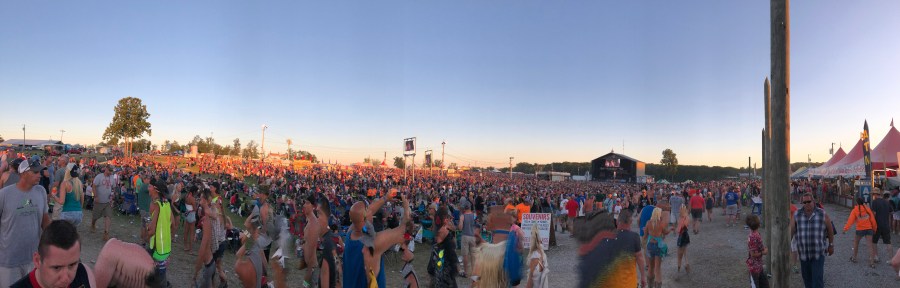
Last night I went to my first concert in almost 2 years. It was simply called Country Concert. Yes, the actual name is Country Concert. The name doesn’t grab anyone’s attention, it doesn’t even sound exciting. But, it’s 10,000+ people, an amazing atmosphere, young up and coming artists, and big names in country music. The headliner I went to see was Eric Church.

Throughout the day, each artist is on a schedule. I know the schedule as it was printed on my badge. So, I’m sitting in my seat waiting……waiting…waiting…….and BAM!! It’s as if the artist appeared from nowhere and hit you with such energy! They choose just the right song to get you excited and out of the seat. This concert was a great time, but my teacher brain was thinking. How can we apply this to a classroom setting?

I often say to my colleagues around me, “Let’s do it to them before they do it to us.” It’s just a little humor to help us start the day. What if we took this to heart like the country artists at Country Concert?

  • What if the first day of school was used to get to know the students as individuals? – I used to dread the first day of school. This isn’t due to summer ending, and waking up at 5:00 AM. It’s due to going over mind numbing rules. I’m using the first day to get to know students. I haven’t decided if I’m using Play Doh, Frayer a Student Smart START, or creating a passion wall. The first day should be fun and a way to show students that school isn’t a boring place!
  • What if I started every class with music playing as students walked in? – In a typical classroom setting, students walk in, sit down (maybe), and wait for the teacher to start. What if this “typical” day could be changed? Students walk in and hear a song they requested the day before. This song plays even as students are working through a bellringer. Music has been a passion of mine for as long as I can remember. Starting a class with music allows me to share a passion of mine, and create a different way to start off a class.
  • What if we started every lesson with some attention grabbing hook? – Transform the classroom, dress up and have “guest-speakers,” go outside for lessons, incorporate food, or use music. It’s so important to connect a lesson to students and try to find ways to “hook” them into the content.

IMG_2421


The Human Element in Teaching

It never fails. It’s like clockwork. Every year I hear the same statement, “Tech is going to replace us, why do we need to teach anymore?” Well, don’t let it replace you. Using tech doesn’t mean having students watch videos on EdPuzzle, and playing Kahoot everyday. Find ways to INTENTIONALLY use tech in your teaching, but do NOT remove the human element from your teaching.

This world is changing and it’s changing fast. It seems a new technology tool emerges every week! Intentional use of technology can help kids create awesome projects, allow kids to share ideas with the world, and allow kids to collaborate with one another. I can’t think of a piece of technology, a $50,000 reading program, flexible seating, or maker-spaces that will be a cure-all for student learning. The biggest difference in helping a child learn is, and always will be, the relationships among students and teachers. We need to keep the human element in teaching!

Looking back on my first 3 years of teaching Social Studies, I was so focused on content and technology that I didn’t have time to understand my students. I’m so passionate about History that I thought it would be infectious. Boy, was I wrong. Push back from students, disruptions in class, and students with their head down sleeping. I thought to myself – How can I fix all of this?

I had a solution! Technology was the answer to all of my problems. Boy, was I wrong! Push back from students, disruptions in class, and students with their head down sleeping. If my passion for history and use of technology couldn’t fix this, then I had to change something.

This past school year, I started focusing on understanding my students. A question came to my mind, “Would I want to be a learner in my classroom?” In the past, I was kidding myself by saying, “Yes.” In reality, the answer was “No.” So, my “Why” for education shifted to relationships. I began talking more with my students, greeting them at the door, remembering their names, understanding where they came from. This shift allowed me to start intentionally blending technology with my students’ passions. Did I still have some behavior problems – yes, every class has them. But, did I have as many behavior problems as before – no!

Here are some rules that I live by in Room 303:

  1. Remember every student’s name by the end of the first day, and show them you remembered their names on the second day.
  2. Greet every student by name at the door. Ask them how they are doing. Tell them you’re glad they are there.
  3. Talk to every student at least twice before they walk out of the classroom.
  4. Don’t rush to judgement, assume, or overreact – if a student is sleeping in class, talk with them and figure out the reason.
  5. Do NOT remove the human element from teaching – 1:1 technology is great, but it’s not a cure-all. Create simulations, interactive lessons, use digital breakouts, gallery walks, or outside lessons. In the end, interact with students and have students interact with each other.