The Week That Was In 234

This week marked the start of a new chapter in my teaching career. I’ve transitioned to Batavia Middle School, where I’m now teaching 8th grade social studies in room 234. While the subject remains the same, I’m facing new procedures, new students, and a new textbook.

Thursday and Friday – Frayers, 3xCER

Adapting to Change

At my previous school, we used TCI History Alive, but now I’m working with McGraw Hill’s Voices of the Past. This change has presented some challenges. Previously, I could easily transfer TCI sections to a Google Doc and link it to activities (like EduProtocol), or directly link TCI sections to activities. However, with McGraw Hill, I can’t transfer content to Google Docs or create links in the same way.

This limitation is particularly frustrating because I prefer using Google Docs for its accessibility. It allows students to quickly access sources with a simple click, which streamlines the class and maintains a good tempo. I’m currently brainstorming ways to work around this issue.

Another adjustment I’m facing is the longer class periods. We now have 65-minute classes, compared to the 47-minute periods I was accustomed to. While this extended time offers more opportunities for activities (as they say in Step Brothers, “There’s so much room for activities”), it’s challenging from a timing perspective. On the bright side, I now only have four periods of Social Studies and co-teach one period of reading workshop with an ELA teacher.

Despite these changes, the first two days flew by.

Thursday: Building Connections

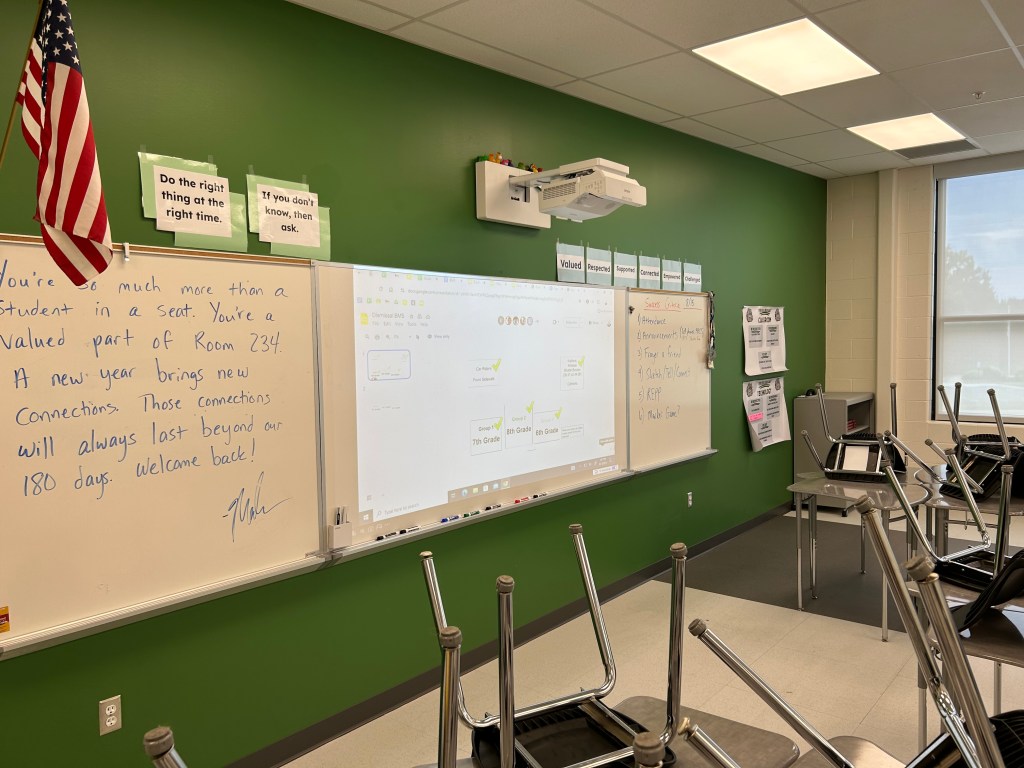
Thursday marked the first day back for everyone. As always, I began by emphasizing the core values of our classroom: respect, value, support, connection, challenge, and empowerment for everyone in room 234.

Although the students won’t receive their Chromebooks until next week, it wasn’t a problem. EduProtocols are versatile and can easily transfer to paper. To foster a sense of value, respect, and connection among the students, we started with a “Frayer a Friend” activity. This exercise included various prompts such as:

  • Their name and birthday
  • Four things they like
  • Four things they dislike
  • Three items they’d want on a deserted island
  • A sketch of their dream vacation

I initially set a six-minute timer for the first round, but many students couldn’t finish in time. That’s perfectly fine – it’s all part of the learning process. On the back of the Frayer, I incorporated an idea from Ariana Hernandez: Sketch, Tell, and Connect. Students sketched something they noticed during their interview, wrote a quick sentence about it, and then explained how it might connect to them personally.

We followed this with another round of Frayer a Friend, this time reducing the time to five minutes. Impressively, 90% of the class finished this round. I used this as an opportunity to reinforce our class goal: improvement with each repetition, doing a bit more each time.

Next, we moved on to a REPP (Random Emoji Power Paragraph) activity with their partners. This is always a hit, bringing great energy and laughter to the classroom. It’s one of my favorite EduProtocols.

To wrap up the day, since we didn’t have Chromebooks, I introduced the Marker Game. Students found a new partner, and each pair received a dry erase marker to stand up between them. I read True/False statements about the syllabus and my class. If they thought the statement was true, they grabbed the marker; if false, they left it alone. This game was a blast and a great way to review important class information.

Overall, it was a successful first day, though I’m eagerly anticipating the arrival of the Chromebooks.
Friday: Deepening Connections and Introducing Myself

On Friday, I wanted to maintain the momentum we’d built. We started with another Frayer a Friend activity, this time partnering students with someone from a different table. I set a four-minute timer, and everyone successfully completed the task.

Next, I introduced the Wicked Hydra activity. I had prepared five images related to me and my life, taping them to poster paper or whiteboards around the room. These images included:

  1. A picture of my family
  2. Me receiving the OCSS MS Social Studies Teacher of the Year award
  3. A photo from my NKU tennis days
  4. A Zach Bryan concert where Bruce Springsteen made a surprise appearance
  5. A picture of Dominic Helmstetter and me presenting at NCSS (interestingly, two classes thought Dominic was Ronaldo and were impressed that I had “met” him!)

The goal of this activity was to introduce myself through questioning strategies while simultaneously developing students’ historical thinking skills of observation and questioning. I rotated all groups through all pictures in 15 minutes.

Following this, I combined a 3xCER (Claim, Evidence, Reasoning) with the Wicked Hydra activity. I emphasized that everything we do in room 234 serves a purpose. In this case, their observations and questions would help them create claims about me. After explaining claims, evidence, and reasoning, I gave the students 10 minutes to come up with claims about me based on the images they had observed.

We concluded the activity by having students share their claims. I answered their questions and shared more about myself, creating a wonderful opportunity for connection and engagement.

This class period was a resounding success, and I’m definitely planning to use this activity again in the future.

In conclusion, despite the challenges of adapting to a new school environment, these first two days have been incredibly rewarding. I’m excited to continue building connections with my students and helping them develop crucial skills through engaging, purposeful activities.

The Power of AI as a Personal Assistant for Teachers

Artificial Intelligence (AI) has rapidly become an invaluable tool in education, transforming how teachers plan, instruct, and assess their students. Here’s an in-depth look at how AI can serve as a personal assistant for educators and the importance of editing and the 80/20 rule in maximizing its effectiveness.

Lesson Planning and Curriculum Development

AI tools, such as ChatGPT, are revolutionizing the way teachers approach lesson planning and curriculum development. These tools can generate lesson plans, create outlines, and provide a wealth of resources tailored to specific subjects and grade levels. Here’s how AI can streamline this critical process:

  1. Generating Ideas: AI can help teachers brainstorm innovative lesson ideas. By inputting a general topic or theme, AI can suggest various activities, discussion points, and multimedia resources that can make the lesson more engaging and comprehensive.
  2. Creating Outlines: Once a lesson idea is generated, AI can assist in organizing the content into a coherent structure. This includes breaking down the lesson into segments such as introduction, main content, activities, and assessments, ensuring a logical flow that enhances student understanding.
  3. Producing Full Lesson Plans: AI can take the outlines and expand them into full-fledged lesson plans. This involves detailing each segment, including step-by-step instructions, necessary materials, and timing. Teachers can then review and tweak these plans to suit their specific classroom dynamics.
  4. Resource Compilation: AI can compile relevant resources such as articles, videos, and interactive activities that align with the lesson objectives. This saves teachers significant time and effort in searching for high-quality materials.

Differentiation and Personalized Learning

Differentiating instruction to meet the diverse needs of students is a critical aspect of effective teaching. AI tools can significantly aid in this by providing customized learning materials and activities. Here’s how:
  1. Tailoring Reading Levels: By inputting specific reading levels, AI can generate texts that are appropriate for students’ comprehension abilities. For example, creating a 500L reading passage ensures that even struggling readers can grasp the content without feeling overwhelmed.
  2. Adapting Learning Styles: AI can create materials that cater to different learning styles, such as visual, auditory, and kinesthetic learners. This includes generating visual aids, audio recordings, and hands-on activities that make the content accessible to all students.
  3. Providing Multiple Formats: AI can produce various formats of the same content, such as summaries, detailed explanations, and interactive quizzes. This allows students to choose the format that best suits their learning preferences and needs.
  4. Creating Adaptive Assessments: AI-driven assessments can adjust their difficulty based on student responses, providing a personalized evaluation experience that accurately reflects each student’s understanding and progress.

Student Engagement

Engaging students is one of the most challenging aspects of teaching. AI can enhance student interaction through innovative and interactive activities. Here are some examples:
  1. Factual Scavenger Hunts: AI can create scavenger hunt activities where students search for facts within provided materials. This not only makes learning fun but also encourages active participation and critical thinking.
  2. Argumentative Writing Prompts: AI can generate prompts for argumentative essays, helping students develop their writing and reasoning skills. By providing diverse and thought-provoking topics, AI can stimulate deeper engagement and discussion.
  3. Q&A with Historical Figures: Tools like storyfile enable students to interact with virtual representations of historical figures. Students can ask questions and receive answers based on historical data, making history lessons more immersive and engaging.
  4. Interactive Simulations: AI can develop simulations and role-playing scenarios that allow students to experience historical events, scientific processes, or mathematical concepts in a hands-on manner, fostering a deeper understanding of the material.

Assessment and Feedback

AI can transform how teachers assess student performance and provide feedback. Here’s how:

  1. Automated Quiz Generation: AI can quickly generate quizzes and tests that align with lesson objectives. These assessments can include various question types, such as multiple-choice, short answer, and essay questions.
  2. Instant Feedback: AI tools can provide immediate feedback to students on their assessments. This helps students understand their mistakes and learn from them in real time, enhancing the learning process.
  3. Data-Driven Insights: AI can analyze assessment results to identify patterns and trends. This enables teachers to pinpoint areas where students are excelling or struggling, allowing for targeted interventions and support.
  4. Formative and Summative Assessments: AI can assist in creating both formative assessments, which monitor student learning during the instructional process, and summative assessments, which evaluate student learning at the end of an instructional unit.

Organizing and Analyzing Data

Managing and analyzing educational data is crucial for informed decision-making. AI can assist teachers in this area by:

  1. Organizing Student Performance Metrics: AI can compile and organize data on student performance, making it easier for teachers to track progress over time. This includes grades, attendance, and behavioral records.
  2. Curriculum Alignment: AI can ensure that lesson plans and assessments align with curriculum standards and learning objectives. This helps teachers stay on track and meet educational requirements.
  3. Identifying Learning Trends: By analyzing data, AI can identify trends in student learning, such as common misconceptions or frequently missed questions. This information is valuable for adjusting instructional strategies.
  4. Generating Reports: AI can create detailed reports that summarize student performance, highlight areas for improvement, and suggest next steps. These reports can be shared with students, parents, and administrators to support collaborative efforts in improving education.

The Importance of Editing

While AI is a powerful tool, it is not infallible. It is crucial for teachers to edit and review the output generated by AI. Here are key reasons why:

  1. Accuracy: AI may produce content that includes factual errors or outdated information. Teachers must verify the accuracy of this content before using it in their classrooms.
  2. Relevance: The content generated by AI should be relevant to the specific context and needs of the students. Editing ensures that the materials are appropriate and tailored to the class’s current learning objectives.
  3. Quality: AI-generated content might lack the nuanced understanding and creativity that human teachers bring to their work. Editing helps to polish the material, making it more engaging and effective.

The 80/20 Rule

The 80/20 rule, also known as the Pareto Principle, is particularly relevant when using AI in education. It suggests that 80% of results come from 20% of efforts. In the context of AI as a personal assistant:

  • Focus on High-Impact Tasks: Teachers should leverage AI for routine and time-consuming tasks, such as grading and lesson planning, which frees up more time for them to focus on the 20% of activities that have the most significant impact on student learning and engagement.
  • Maximize Efficiency: By allowing AI to handle the bulk of administrative tasks, teachers can dedicate more energy to innovative teaching methods and personal interactions with students, which are crucial for fostering a positive learning environment.

Conclusion

AI is not a replacement for teachers but a tool that, when used effectively, can enhance their capabilities and improve educational outcomes. By understanding the importance of editing AI-generated content and applying the 80/20 rule, teachers can make the most of these technological advancements. Embracing AI with intentionality and purpose will ensure that it serves as a valuable assistant in the modern classroom, empowering educators to focus on what they do best: inspiring and educating the next generation.

Boosting Productivity with Keyboard Shortcuts on Mac and Windows

As educators, time is precious, and maximizing productivity is crucial. Whether you’re using a Mac or a Windows computer, keyboard shortcuts can save you time and streamline your workflow. These shortcuts are particularly helpful when integrating EduProtocols into your classroom activities. Here’s a handy guide to some essential keyboard shortcuts and how they can enhance your use of EduProtocols.
Copy and Paste with Command+C and Command+V or Ctrl+C and Ctrl+V

The basic shortcuts for copying and pasting are Command + C and Command + V for Mac users, and Ctrl + C and Ctrl + V for Windows users. These are fundamental for a variety of tasks:

  • Copying Text and Images: Quickly transfer text and images between documents and slides.
  • Organizing Information: Easily move elements within your EduProtocols templates.

Duplicating Shapes and Text with Command+D or Ctrl+D

One of the frequent tasks in activities like Sketch and Tell or Thick Slides is duplicating shapes and text. On a Mac, you can use Command + D, and on Windows, you can use Ctrl + D. This shortcut makes it easy to create multiple copies of an image, shape, or text box, speeding up the design process. For example:

  • Sketch and Tell: Quickly duplicate images to create multiple illustrations.
  • Thick Slides: Duplicate word art fonts to maintain consistent styles across slides.
  • Iron Chef: Clone elements to create uniform layouts for collaborative work.

Selecting All Text with Command+A or Ctrl+A

When you need to select all the text on a page for copying and pasting, Command + A (Mac) or Ctrl + A (Windows) is your go-to shortcut. This is particularly useful for:

  • Copying Text for AI Integration: Select all text on a webpage or document to easily copy and paste it into AI platforms for processing.
  • Organizing Information: Gather all text from a source to ensure no details are missed when transferring information to your EduProtocols templates.

Finding Specific Items with Command+F or Ctrl+F

Searching for specific terms or phrases within a document or webpage is made simple with Command + F (Mac) or Ctrl + F (Windows). This shortcut is indispensable for:

  • Research and References: Quickly locate key terms or facts on a webpage or document.
  • Text Analysis: Help students find and highlight important information during reading activities.
Inserting Hyperlinks with Command+K or Ctrl+K

Hyperlinks are essential for connecting resources and references. Use Command + K (Mac) or Ctrl + K (Windows) to insert hyperlinks efficiently. This can enhance:

  • Thick Slides and CyberSandwiches: Link directly to sources, ensuring students have access to relevant information.
  • Resource Compilation: Create interconnected documents and slides for comprehensive study materials.

Commenting on Google Docs and Slides

Adding comments in Google Docs or Slides is crucial for collaborative work and feedback. Use Command + Option + M on a Mac and Ctrl + Alt + M on Windows to quickly add comments. This is especially useful for:

  • Feedback and Collaboration: Easily provide feedback on student work.
  • Peer Review: Facilitate peer review processes by enabling students to comment on each other’s work.

Other Essential Keyboard Shortcuts

Here are a few more shortcuts that can further streamline your tasks:

  • Reopen Closed Tabs with Ctrl+Shift+T: Accidentally closed a tab? No problem. Ctrl + Shift + T (Windows) or Command + Shift + T (Mac) will reopen it.
  • Paste Without Formatting with Ctrl+Shift+V: Need to paste text without bringing over unwanted formatting? Ctrl + Shift + V (Windows) or Command + Shift + V (Mac) will do just that.
  • Undo with Command+Z or Ctrl+Z: Made a mistake? Quickly undo it with Command + Z (Mac) or Ctrl + Z (Windows).
  • Redo with Command+Shift+Z or Ctrl+Shift+Z: Redo an action with Command + Shift + Z (Mac) or Ctrl + Shift + Z (Windows).

Teaching Students Keyboard Shortcuts

Teaching students these shortcuts can significantly boost their productivity and digital literacy. By mastering these tools, students can:

  • Work More Efficiently: Complete assignments and projects faster.
  • Enhance Learning: Spend less time on technical tasks and more time on critical thinking and learning.
  • Develop Digital Skills: Build essential skills for future academic and professional success.

Conclusion

Integrating these keyboard shortcuts into your daily routine can significantly enhance your productivity and effectiveness, especially when using EduProtocols. By mastering these simple yet powerful tools, you can focus more on teaching and less on navigating through software. Happy shortcutting!

Creative Enhancements for Iron Chef and Thick Slides

As educators, we’re always on the lookout for ways to make our lessons more engaging and effective. One strategy that stands out is using the Iron Chef EduProtocol along with thick slides. But how can we enhance these tools to maximize student engagement and learning? Let’s dive in!

Top 10 Ways to use the Secret Ingredient in the Iron Chef

Adding a secret ingredient to the Iron Chef EduProtocol can spice things up and get students thinking creatively. Here are my top ten ways to change up the secret ingredient and why they work so well:

  1. Analogy or Metaphor: Create a one-sentence analogy or metaphor that explains the topic. This encourages students to think abstractly and make connections to other concepts.
  2. News Headline: Write a news headline that captures the essence of the topic. Headlines are catchy and force students to distill information to its most important elements.
  3. Interview Question: Come up with one interview question you would ask an expert on the topic. This gets students thinking about the topic from an investigative perspective.
  4. Tweet: Compose a tweet (280 characters) summarizing the main point or an interesting fact about the topic. Tweets are concise and make students focus on clarity and brevity.
  5. Visual Representation: Draw a quick doodle or icon that illustrates the topic. Visuals help students remember and understand concepts better.
  6. Personal Connection: Write a one-sentence connection to your own life or experience. Personal connections make the learning more relevant and memorable.
  7. Concept Map: Sketch a simple concept map showing how the topic connects to one other idea. Concept maps encourage students to see the bigger picture and how ideas interrelate.
  8. Soundtrack: Choose a song that represents the topic and explain in one sentence why you chose it. This taps into students’ emotions and helps them connect with the material on a deeper level.
  9. Advertisement: Create a short slogan promoting the topic. Slogans are fun and make students think about the topic in a persuasive way.
  10. Historical Context: Write a sentence that places the topic in a historical context. This helps students understand the importance and relevance of the topic over time.

These secret ingredients can be tailored to any subject or grade level, sparking creativity and encouraging students to delve deeper into the material.

Top 10 Ways to Change Up Thick Slides

Thick slides are a fantastic tool for organizing and presenting information. To make them even more effective for note-taking, consider these top ten ideas and why they’re so effective:

  1. Cause and Effect: List the causes and effects related to the topic in a simple diagram or table. This framework helps students understand relationships and consequences.
  2. Pros and Cons: Create a table listing the pros and cons of a particular event, decision, or idea related to the topic. This encourages critical thinking and balanced analysis.
  3. Timeline: Create a mini-timeline with 4-5 key events related to the topic. Timelines help students visualize sequences and historical context.
  4. PEEL Paragraph: Have students write a paragraph using the PEEL structure: Point, Evidence, Explanation, and Link. This method strengthens their argumentative writing and analytical skills.
  5. Problem and Solution: Describe a problem related to the topic and propose possible solutions. This approach encourages problem-solving and creative thinking.
  6. Fact vs. Myth: Create a table or list that distinguishes facts from common myths about the topic. This helps students develop critical thinking and discernment.
  7. Hero’s Journey: Smash thick slides with the Hero’s Journey and include the call to action, threshold, helper, abyss, transformation, and return. This narrative framework deepens students’ understanding of storytelling and personal growth.
  8. Mind Map: Create a mind map that shows the connections between different aspects of the topic. Mind maps foster holistic understanding and recall.
  9. RACES Paragraph: Write a paragraph using the RACES strategy: Restate the question, Answer the question, Cite evidence, Explain the evidence, and Summarize. This method ensures thorough and structured responses.
  10. SWBST (Somebody, Wanted, But, So, Then): Use the SWBST framework to summarize a story or historical event. This helps students identify key elements and understand the narrative structure.

By integrating these frameworks into thick slides, educators can enhance students’ note-taking skills and ensure a deeper understanding of the material. The combination of creative secret ingredients and structured note-taking strategies makes learning more engaging, interactive, and effective.

Give these ideas a try in your classroom and watch your students thrive with the Iron Chef EduProtocol and Thick Slides!

Racking and Stacking EduProtocols: Maximizing Student Engagement and Learning

As educators, we’re always looking for ways to make our lessons more engaging and effective. One powerful strategy I’ve found is “racking and stacking” EduProtocols. But what exactly does this mean, and why is it so beneficial? Let’s dive in!

What is Racking and Stacking?

“Racking and stacking” refers to the practice of sequencing multiple EduProtocols within a single lesson or unit. It’s like creating a playlist of engaging activities, each building upon the last to deepen understanding and reinforce key concepts.

Why Rack and Stack?
  1. Maintains high engagement: By varying activities, you keep students interested and focused.
  2. Addresses multiple learning styles: Different protocols cater to visual, auditory, and kinesthetic learners.
  3. Scaffolds learning: Each activity builds on the previous one, reinforcing and expanding knowledge.
  4. Encourages deeper thinking: Students revisit content in different ways, promoting higher-order thinking skills.
A Racked and Stacked Lesson Example: Manifest Destiny

Let me walk you through a recent lesson I taught on Manifest Destiny, where I racked and stacked several EduProtocols. This particular rack and stack was designed to span two days, allowing for deeper engagement with each protocol and the content.

  1. Wicked Hydra
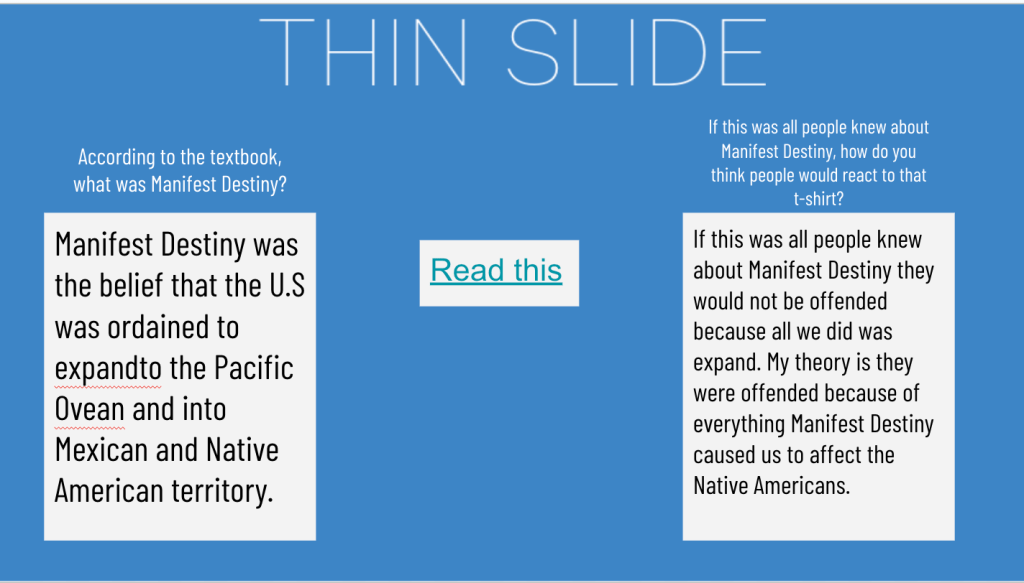
    Why I started here: This protocol activates prior knowledge and curiosity. I displayed a headline about a controversial “Manifest Destiny” t-shirt, prompting students to generate questions. It immediately created interest and set the stage for deeper exploration.
  2. Thin Slide
    Why it came next: After piquing their curiosity, I wanted to provide some basic background. The Thin Slide allowed students to quickly process a short textbook excerpt on Manifest Destiny, giving them a foundation for further analysis.
  3. 8 Parts of Speech (8pArts)
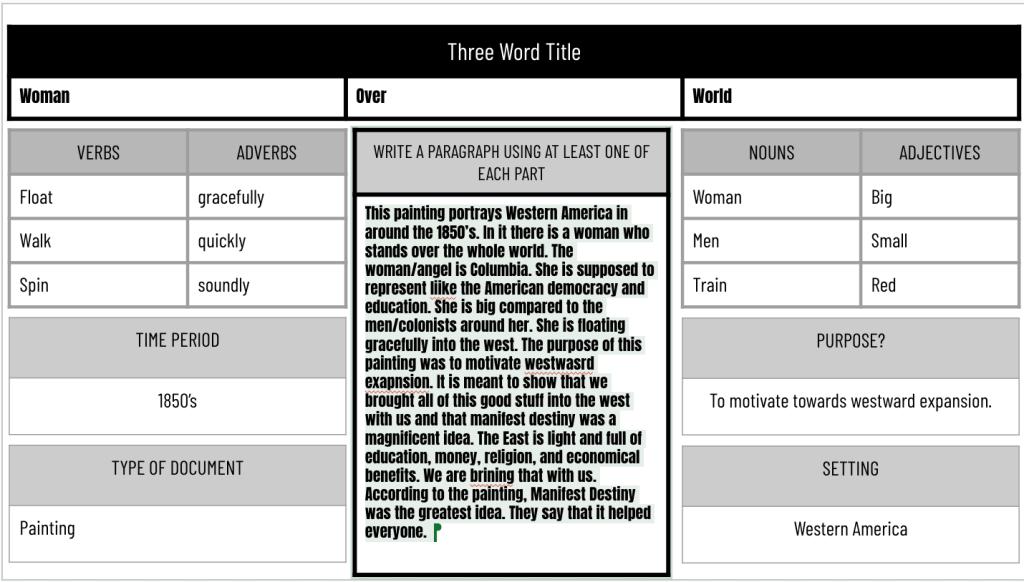
    Why I used this third: Now that students had some context, I had them analyze the famous “American Progress” painting. The 8pArts protocol encouraged close observation and descriptive language, deepening their understanding of Manifest Destiny’s visual representation.
  4. Thick Slide
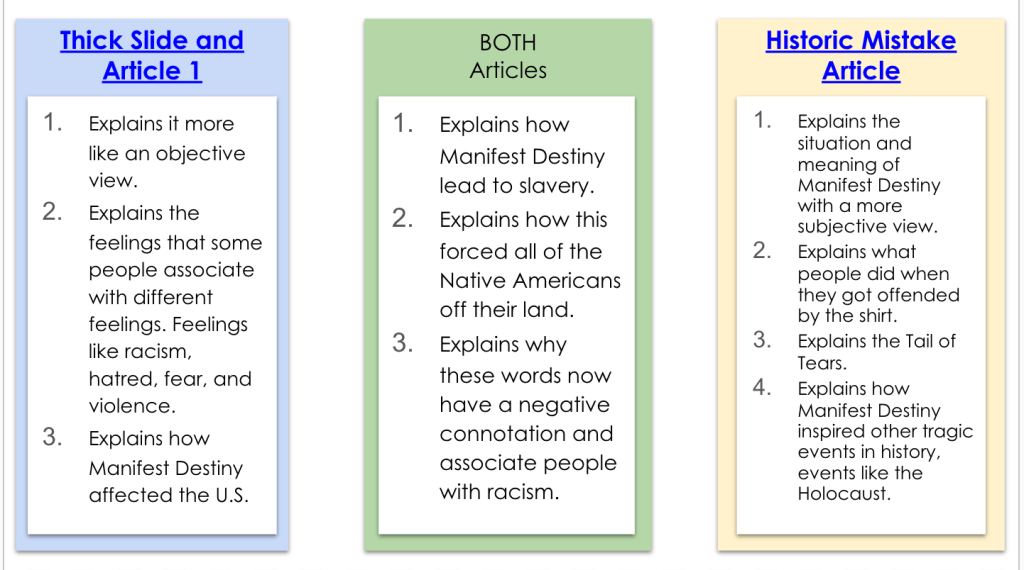
    Why it followed: Building on their growing knowledge, the Thick Slide pushed students to engage with a more complex article. They had to extract key ideas, find relevant quotes, and make connections – all higher-order thinking skills.
  5. CyberSandwich (Compare)
    Why I placed it here: At this point, students had multiple sources of information. The compare component of CyberSandwich allowed them to synthesize their learning, contrasting the news article with their Thick Slide findings.
  6. Sketch and Tell
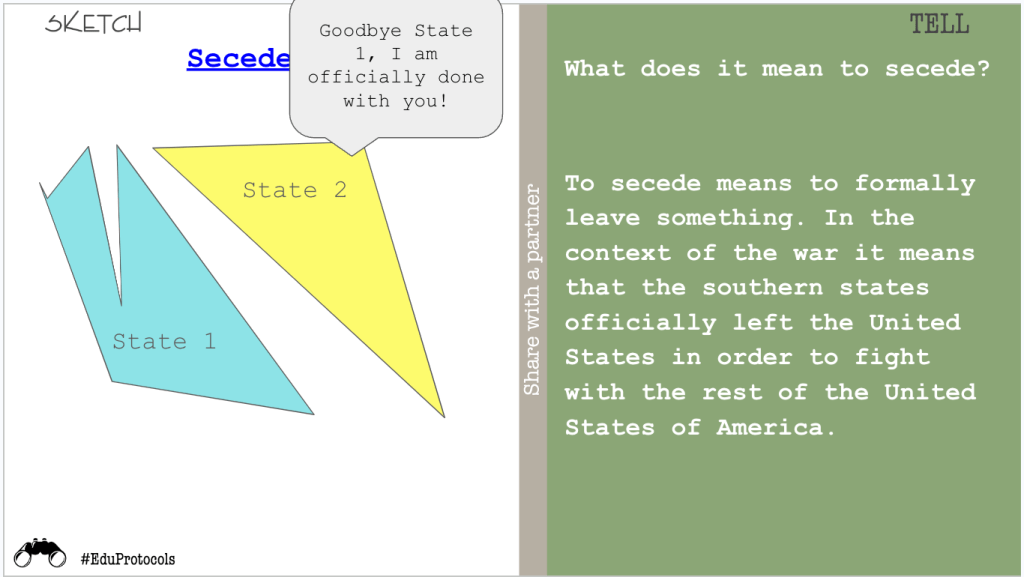
    Why I ended with this: As a final reflection, students revisited the original textbook excerpt, adding new information they’d learned throughout the lesson. This protocol encouraged metacognition and allowed students to visually represent their expanded understanding.

This Rack and Stack can be found here.

The Power of the Stack

By racking and stacking these EduProtocols over two days, I created a dynamic learning experience that allowed for both breadth and depth. Students had time to fully engage with each protocol, building their understanding step by step. This extended approach also allowed for more meaningful discussions and reflections between activities.
Racking and stacking EduProtocols isn’t just about using multiple activities – it’s about thoughtfully sequencing them to maximize learning. When done well, it creates a lesson that’s greater than the sum of its parts, leading to deeper understanding and more engaged students.

Learning from the Masters

When it comes to racking and stacking EduProtocols, one educator stands out as a true master of the craft: Justin Unruh. His innovative approaches to combining protocols have inspired countless teachers, including myself. If you’re looking to dive deeper into the world of racked and stacked EduProtocols, I highly recommend checking out Justin’s templates. They offer excellent “grab and go” options for easy implementation in your classroom, perfect for both newcomers to EduProtocols and experienced users looking for fresh ideas.

So next time you’re planning a lesson or unit, consider how you might rack and stack EduProtocols to create a truly powerful learning experience. Whether you’re spreading it across multiple days like my Manifest Destiny lesson or creating a single power-packed session, the possibilities are endless!

Using AI to Bring Local History to Life in the Classroom

As social studies teachers, we’re always looking for ways to make history more engaging and relevant for our students. One powerful approach is incorporating local history into our lessons. However, finding and using primary sources from our communities can be challenging, especially when dealing with old documents that are difficult to read. This is where AI can be a game-changer.

Recently, I experimented with using AI to help extract and modernize text from a local historical newspaper, making it more accessible for my students. Here’s how I did it:

Step 1: Find a Relevant Primary Source

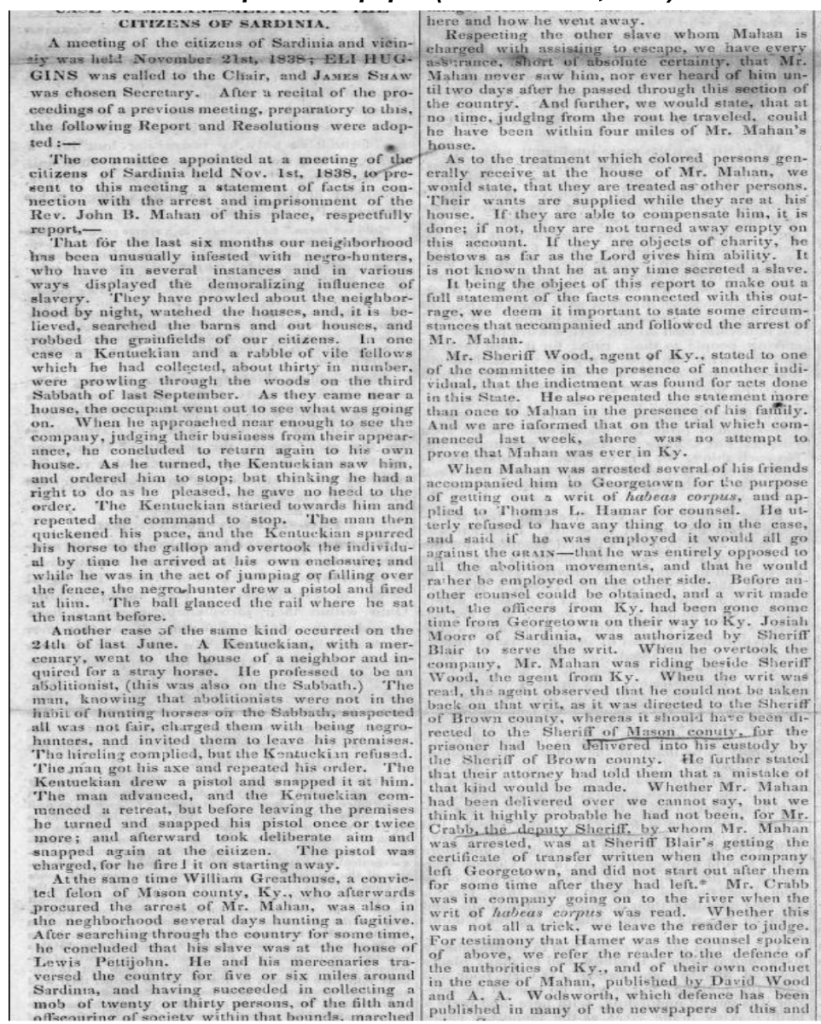
I discovered an 1838 issue of “The Philanthropist,” an anti-slavery newspaper published in our town by local abolitionist James G. Birney. The front page contained an article about citizens in nearby Sardinia, Ohio protesting the arrest of a reverend who had helped enslaved people escape.

Step 2: Capture an Image of the Text

I took a screenshot of the newspaper article. The text was faded and in an old-fashioned typeface, making it difficult for students to read.

Step 3: Use AI to Extract and Modernize the Text

I uploaded the image to Claude, an AI assistant capable of analyzing images. I asked Claude to transcribe the text into modern English while preserving the original meaning and tone. Within seconds, I had a clear, readable version of the article. ChatGPT or Gemini can also be used as well.

Step 4: Verify and Edit the AI Output

I quickly scanned the AI-generated text to check for any obvious errors or misinterpretations. In this case, the output looked accurate, but it’s always important to review AI-generated content.

Step 5: Create an Engaging Lesson

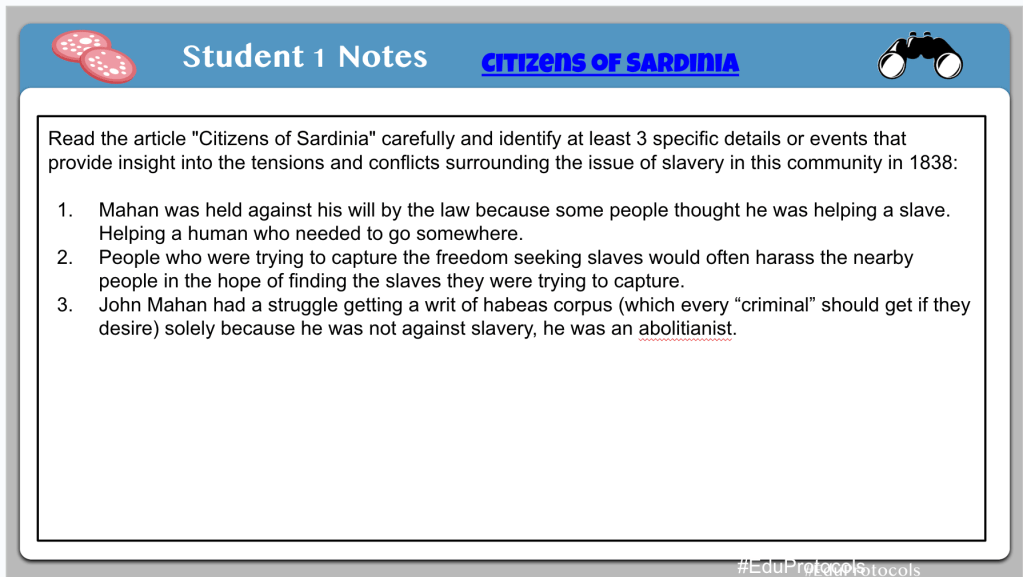
With the modernized text, I developed a Cybersandwich lesson asking students to identify specific details about the tensions surrounding slavery in our community in 1838. This brought a powerful piece of local history to life in a way that was accessible and engaging for my students.

Benefits of This Approach:

  1. Makes difficult-to-read primary sources accessible to students
  2. Saves time compared to manual transcription
  3. Allows incorporation of more local history into lessons
  4. Engages students with relatable, place-based historical content

By leveraging AI in this way, we can open up a wealth of local historical resources that might otherwise remain unused in our classrooms. This approach not only makes history more relevant to our students but also helps them develop a deeper connection to their community’s past.

Have you tried using AI to bring local history into your classroom? I’d love to hear about your experiences and ideas in the comments below!

Citizens of Sardinia CyberSandwich Lesson Link

The Week That Was In 505

This is the last The Week That Was In 505. It will be changing to The Week That Was in 234 as I have changed schools and classrooms.

The New Richmond community has been a part of my life since 2nd grade. It is my alma mater. I’m in their athletic hall of fame for tennis. My parents still live in the community. It is where I have taught the last 12 years. But, it was time for a change. I’m moving onto Batavia Middle School and teaching 8th grade social studies.

What does this mean for all the template links on this site? I don’t know….it depends on how long they keep my account open. I have too many template links, and a messy drive, and it’s next to impossible for me to track down all these links. We will just start fresh with the new school year.

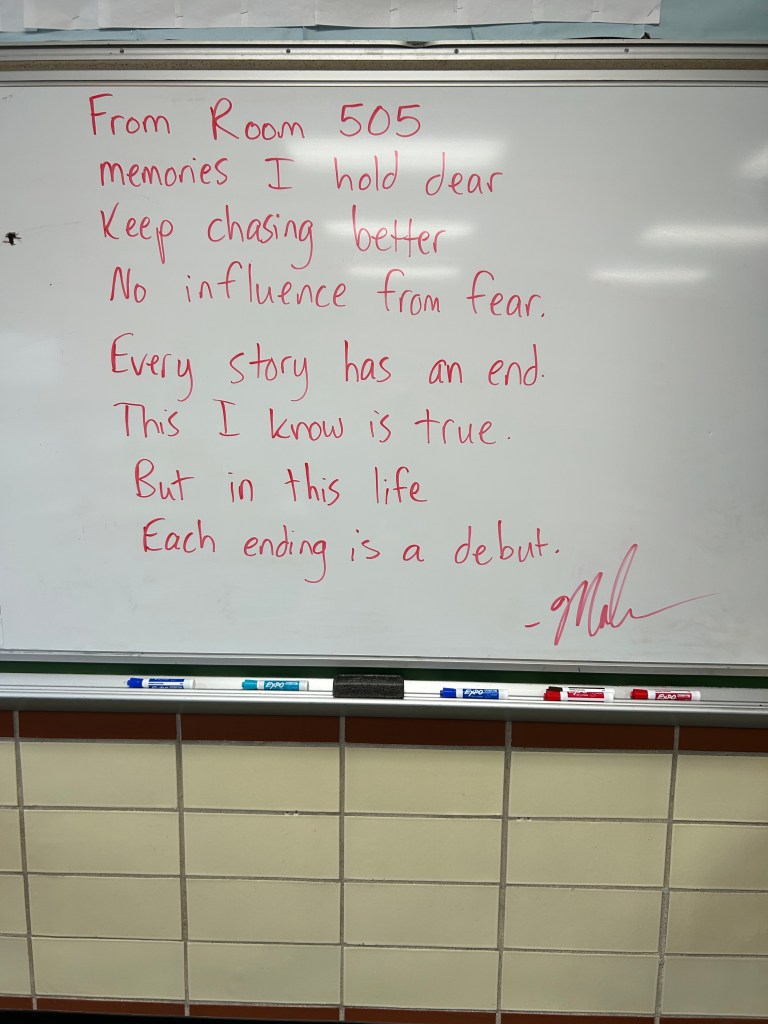
Every year I write a note on my board and walk out. Here is my last note:

Monday – Escape Room, Google Form

Monday

Monday was really the only day of teaching this week. Knowing how middler schoolers can be, I needed something engaging. I used my good buddy Claude AI to help me design an escape room. Claude came up with a series of puzzles and games to help students figure out a clue to unlock the Google Form.

The escape room we designed was related to the content students learned all year – causes of the American Revolution, the Constitution, Westward Expansion, and causes of the Civil War.

Claude did an excellent job coming up with some basic puzzles. For example:

  1. Students had to put westward expansion events in chronological order for a number lock.
  2. There was a series of multiple choice questions where the correct answers spelled out the cause of the Civil War that students had to unscramble.
  3. The Cryptogram was fun, but it wasn’t perfect. Some of the words and letter clues were off.
  4. One of the clues specific letters from the answers were unscrambl;es and spelled out FEDERALISM.

Overall, Claude did an excellent job coming up with ideas. I put this escape room together in 30 minutes. Claude also helped me come up with rhymes to help students find the next puzzle thgat I hid somehwere ion my classroom.
Ultimately, the escape room built up to a 3 digit lock box where the students had to do some math:

Clue 1: Start with the total number of representatives in the U.S. House of Representatives.
Clue 2: Subtract the total number of senators in the U.S. Senate.
Clue 3: Subtract the number of the amendments that abolished slavery and involuntary servitude, except as punishment for a crime.
Clue 4: Subtract the number of the amendment that granted citizenship rights and equal protection under the law to all persons born or naturalized in the United States.
Clue 5: Subtract the number of the amendment that reserves powers not delegated to the federal government to the states or the people.

It was an engaging, and awesome, last Monday of school.

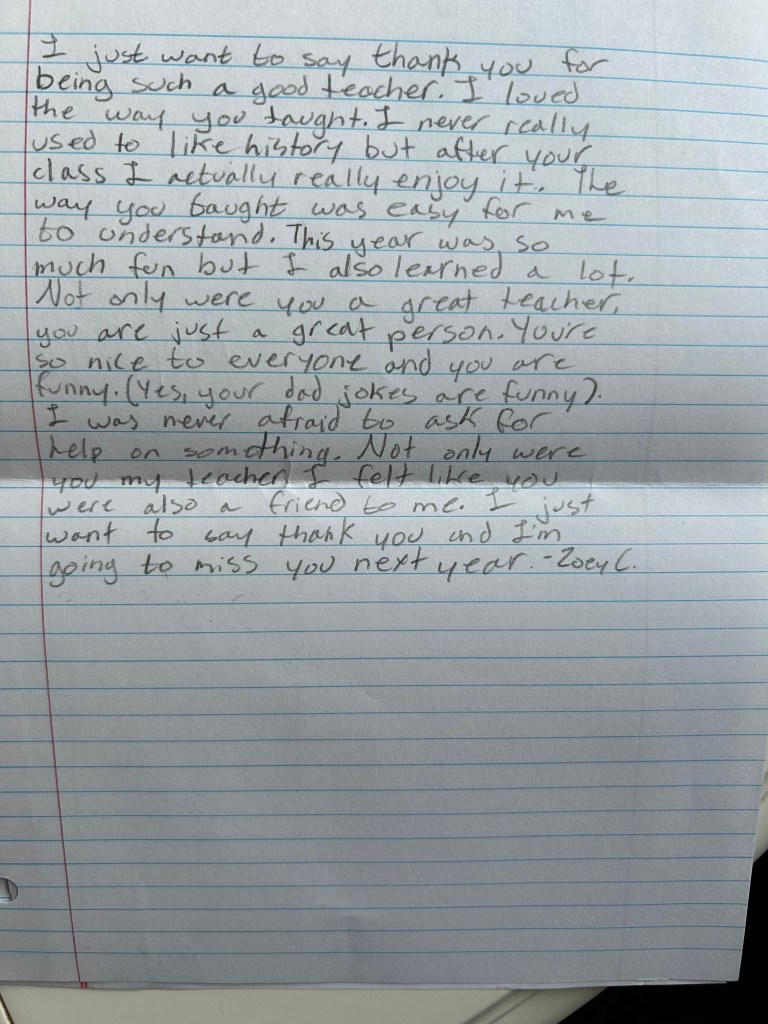
I don’t often share any notes I get, but I keep everything in a basket, and I thought I would share some…

The Week That Was In 505

Monday through Friday:

  1. Civil War Veteran EduProtocols
  2. Success Criteria

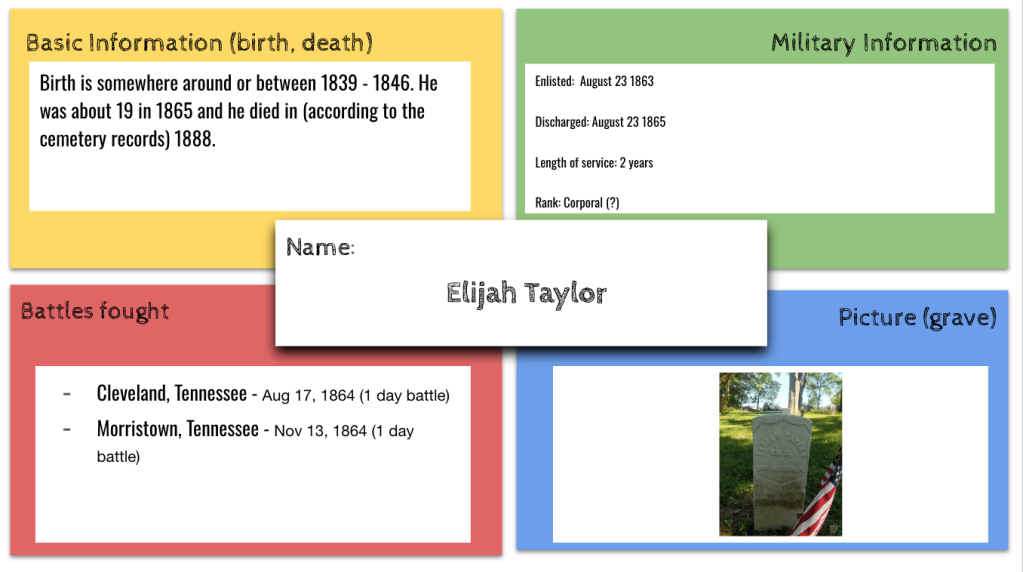
This week, my students embarked on a fascinating research project to uncover the stories of Civil War veterans buried in Watkins Hill Cemetery, located right behind our school. By combining a series of EduProtocols, the students were able to organize their findings and piece together the contributions these brave soldiers made to the Union victory.

To kick off the project, students utilized the Fold3 database, a rich resource for military records, as well as information from the cemetery itself and the American Battlefield Trust website. Armed with these tools, they took on the role of historical detectives, digging deep to unearth details about each veteran’s life and service.

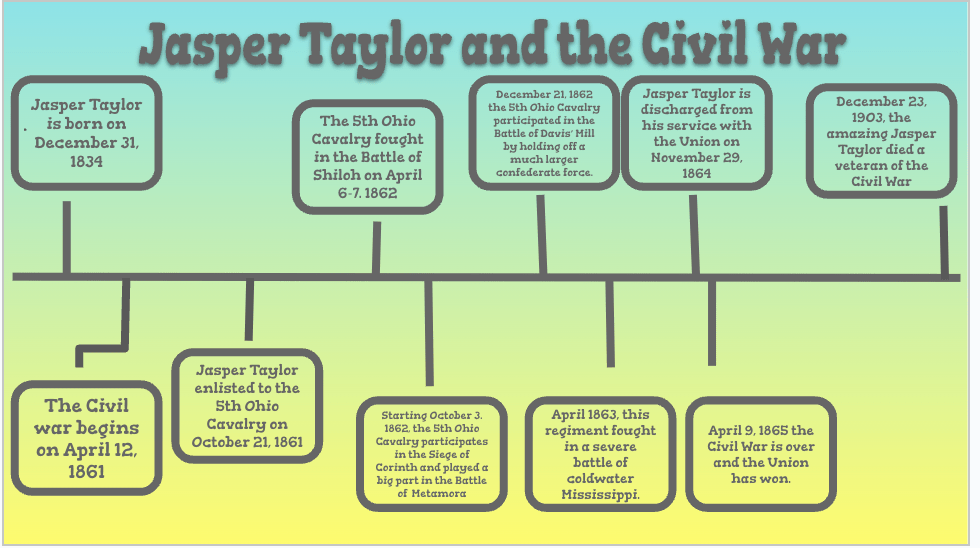
The EduProtocols provided a structured framework for the students to present their discoveries. They began by creating a Frayer model to capture basic information about their chosen veteran, such as their birth and enlistment details, regiment, and company. Next, they constructed a timeline to place the veteran’s service within the broader context of the Civil War, marking key milestones like enlistment, discharge, and the battles they fought in.

One of the most engaging aspects of the project was the “Thick Slide,” where students delved into a specific battle their veteran participated in. They researched the date, location, and significant events of the battle, bringing the veteran’s experience to life. By watching videos about the daily life of Civil War soldiers and the food they ate, the students gained a more intimate understanding of the challenges these men faced.

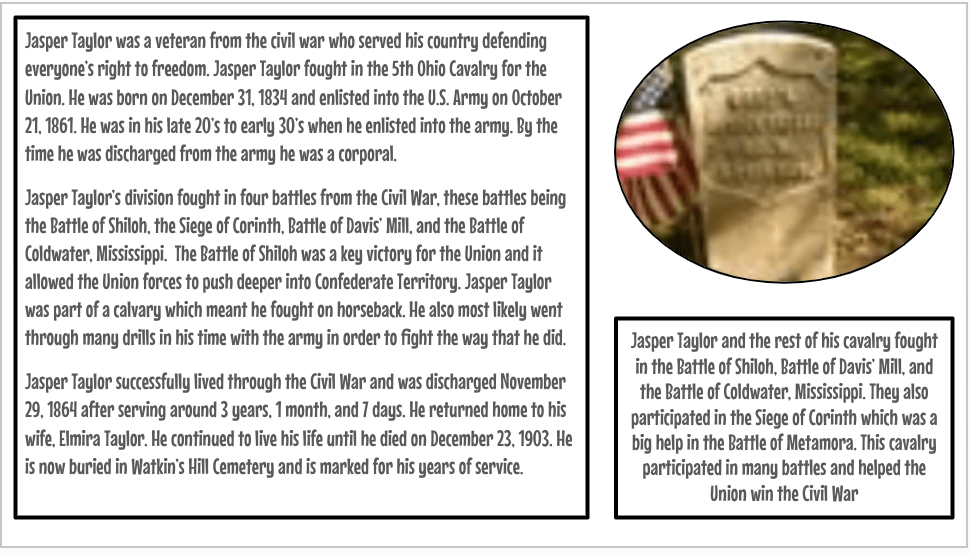
As a culminating activity, the students wove together all the threads of their research to craft a compelling biography of their veteran. They reflected on how each individual contributed to the Union’s ultimate victory, whether through bravery on the battlefield or vital support roles behind the lines.

I asked students what they learned from this project. Here was an interesting comment from a student on the reflection form…”That even though we mainly focus on the big events in history, all the people involved are very important to the overall event.”

Watching my students engage so deeply with local history was truly rewarding. They not only honed their research and critical thinking skills but also developed a profound appreciation for the sacrifices made by these long-ago soldiers. By connecting with the past on such a personal level, they gained a new perspective on the impact of the Civil War on our community and the nation as a whole.

Projects like this one remind us of the power of place-based learning and the importance of preserving local history. I’m incredibly proud of my students’ dedication and the insights they uncovered, and I look forward to exploring more ways to bring the past to life in our classroom.

The Week That Was In 505

As educators, it is our responsibility to make history come alive for our students. By employing a variety of teaching strategies and resources, we can help them develop a deep understanding and appreciation for the past. In this blog post, I will share my experience teaching the Civil War to my students, highlighting the activities and projects that proved most effective in engaging them and fostering their learning.

Monday – Assessment (I can’t share the EMC2Learning templates – sorry)

Tuesday – Start of the Civil War

Monday

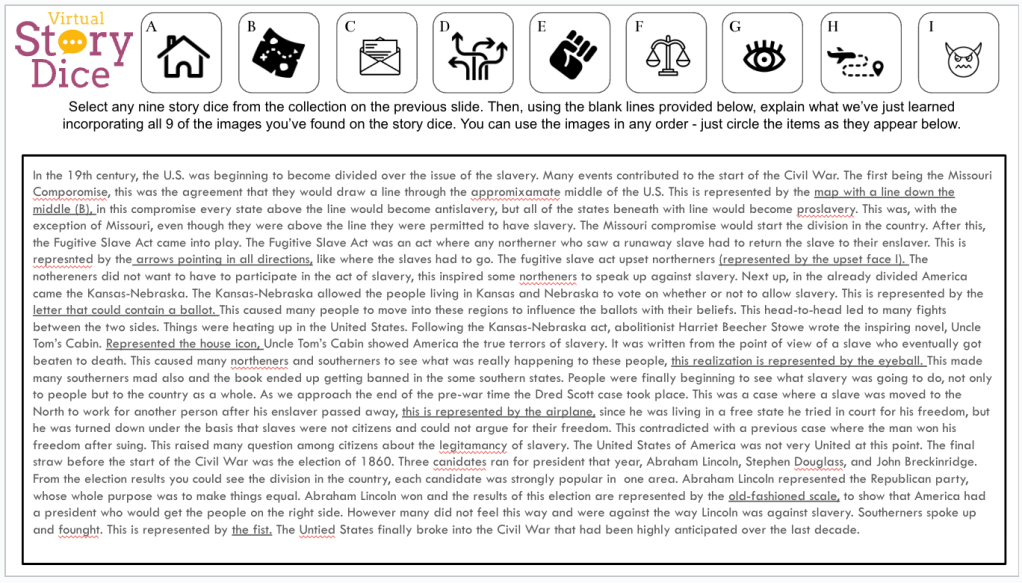
To assess my students’ understanding of the Civil War and the events leading up to it, I provided them with three assessment options on Monday: a Story Dice template, a Video Game template, and a Sketch and Tell-o Connect activity. These diverse assessment methods allowed students to demonstrate their knowledge in creative and engaging ways, catering to different learning styles and preferences.

The Story Dice template required students to select nine images that represented or symbolized the events and factors contributing to the growing tensions over slavery. They then wrote a paragraph explaining how these events and factors led to the Civil War, incorporating the selected images.

The Video Game template challenged students to create a game proposal that included at least four of the events or factors studied. They had to explain how each event or factor was represented in the game and discuss the educational value of their proposed game.

Lastly, the Sketch and Tell-o Connect activity asked students to create six sketches representing the events leading up to the Civil War. They then made connections by creating a claim, evidence, and reasoning for the question, “What series of disagreements and deals made between the Northern and Southern states finally caused the Civil War?”

Tuesday

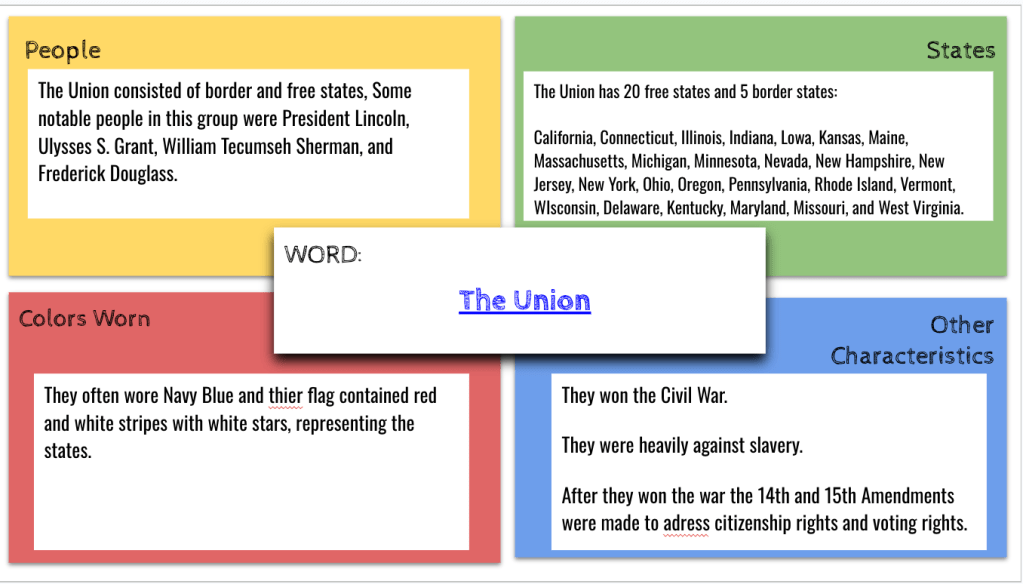
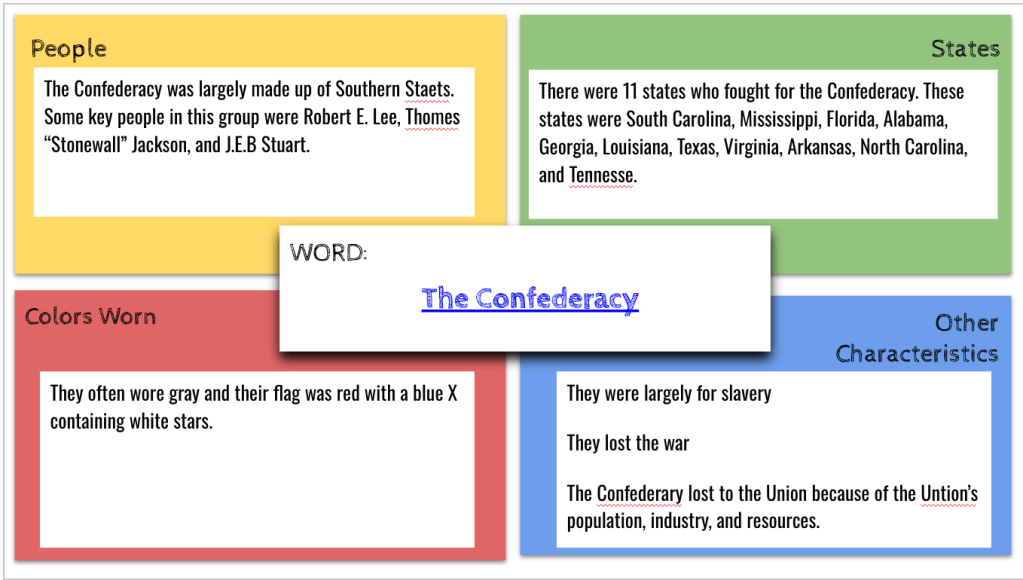
Following the summative assessment, I utilized a combination of resources and activities to introduce the Civil War. On Tuesday, I had my students complete a Frayer Model activity, where they collected information about the Union and Confederate armies, including the states involved, colors worn, and other characteristics. This activity helped them organize their knowledge and understand the opposing forces.

I also had my students watch an EdPuzzle video on the start of the Civil War. The video provided a concise yet informative overview of the key events, battles, and leaders, allowing students to visualize the important aspects of the war. The EdPuzzle platform enabled me to embed questions throughout the video, ensuring active engagement and comprehension.

Thursday

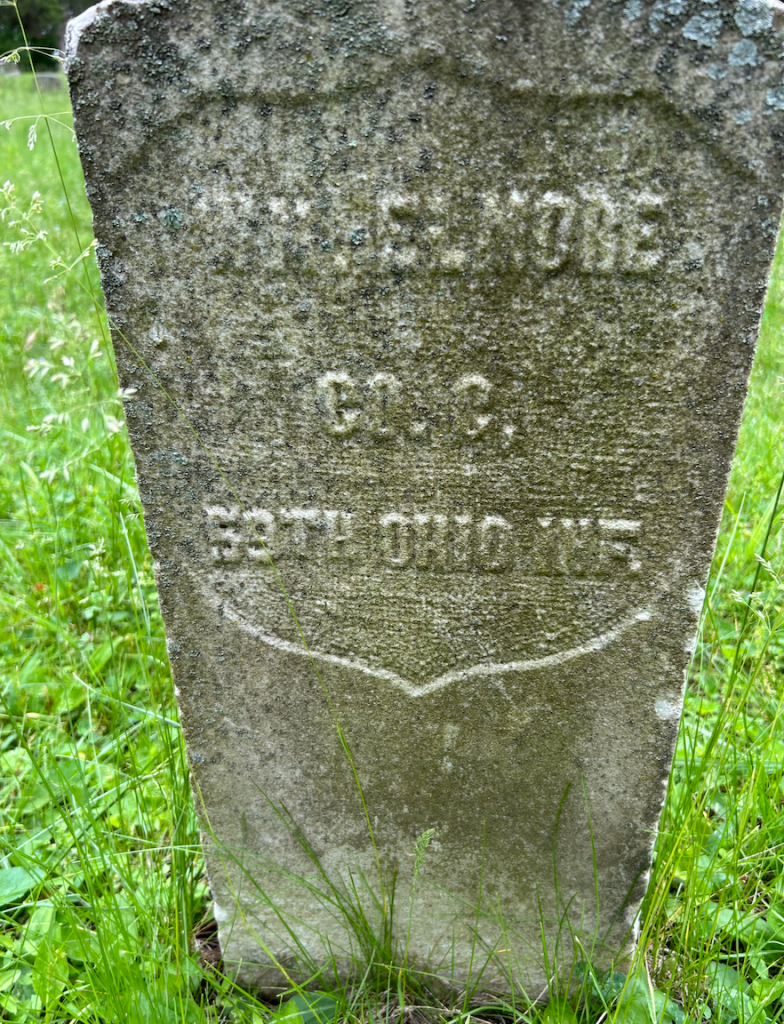
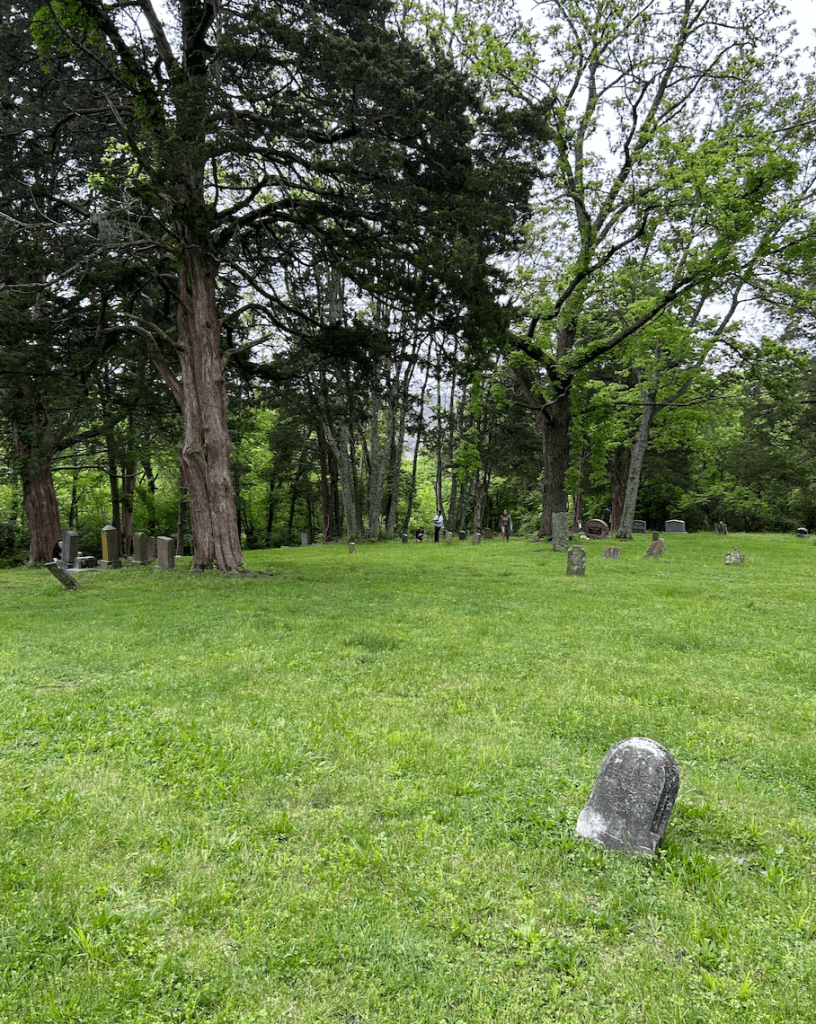
On Thursday, I embarked on an exciting project that connected our classroom learning with local history. Near our school grounds lies the Watkins Hill Cemetery, which houses the graves of several Civil War veterans. I instructed my students to research and document the names of these veterans, along with the companies and regiments in which they served.

To make the most of this opportunity, I took my students on a field trip to the cemetery. They had the chance to explore, locate the graves, and gain firsthand knowledge about the individuals who played a significant role in our nation’s history. This hands-on experience brought history to life and fostered a deep connection with the past.

Building upon this experience, I introduced my students to Fold3, a comprehensive military veteran database. Using a Google Slidedeck containing EduProtocols, students organized their research findings and delved deeper into the stories of the Civil War veterans. They analyzed numerical data points, researched specific battles, and pieced together the historical context in which their chosen veterans lived.

Conclusion

By employing a multifaceted approach to teaching the Civil War, I was able to engage my students and help them develop a profound understanding of this pivotal moment in history. The combination of creative summative assessments, introductory activities, and hands-on exploration of local history created a comprehensive and meaningful learning experience.

I encourage fellow educators to explore opportunities within their communities to connect history with local landmarks. By immersing students in the stories of the past, we can ignite their curiosity, foster a love for learning, and help them appreciate the sacrifices made by those who came before us.

The Week That Was In 505

This week was our last testing week, so we had two shortened class periods. I was continuing the causes of the Civil War and my essential question, “Which conflicts over slavery led to the Civil War?”

Last week, our focus was on compromises such as the Missouri Compromise, Compromise of 1850, and the Fugitive Slave Act. This week we focused on finishing up the Kansas Nebraska Act, learning about Uncle Tom’s Cabin, Dred Scott, and the Election of 1860. I have never really focused on the Election of 1860, so I wrapped some EduProtocols around a lesson from the Retro Report.

Monday – Sketch and Tell-o Analogies

Tuesday – Uncle Tom’s Cabin

Wednesday – Dred Scott, Amendments Sketch and Tell

Friday – Election of 1860

Monday

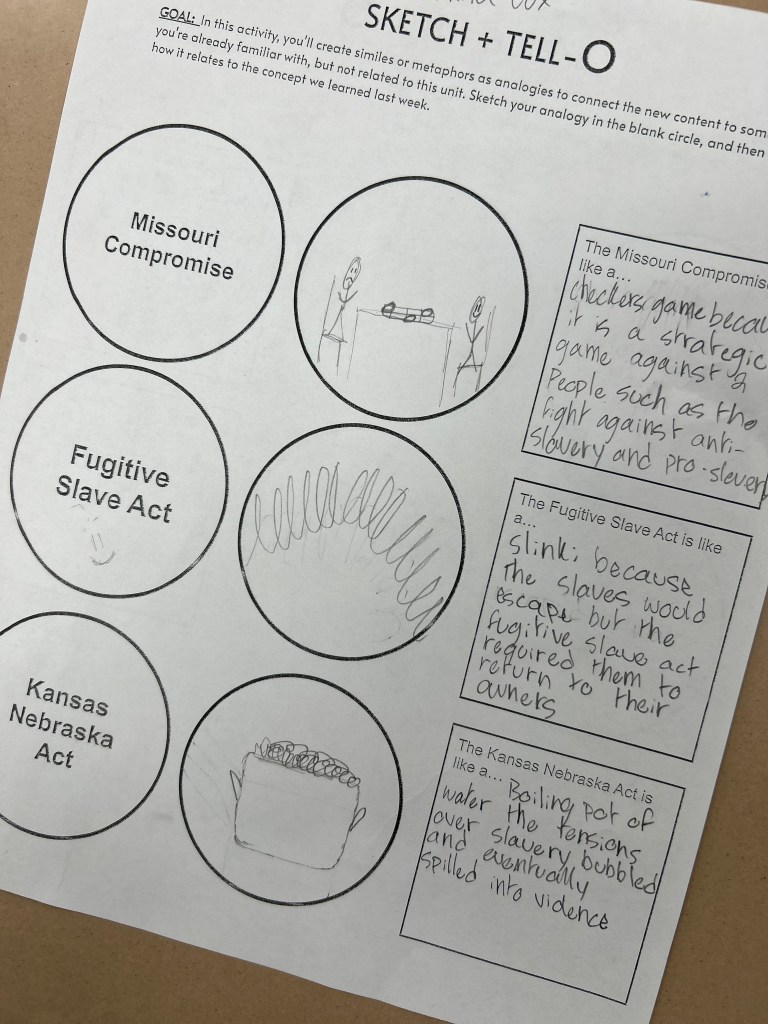
On Monday, I began class with a Sketch and Tell-o that had students thinking about analogies. I wanted them to review what they learned last week (Missouri Compromise, Fugitive Slave Act, Kansas Nebraska Act) by creating similes. For example, they would sketch and object for the simile connection and then write how the Missouri Compromise is like that object. We did this for 25 minutes and then moved onto the start of a new lesson.

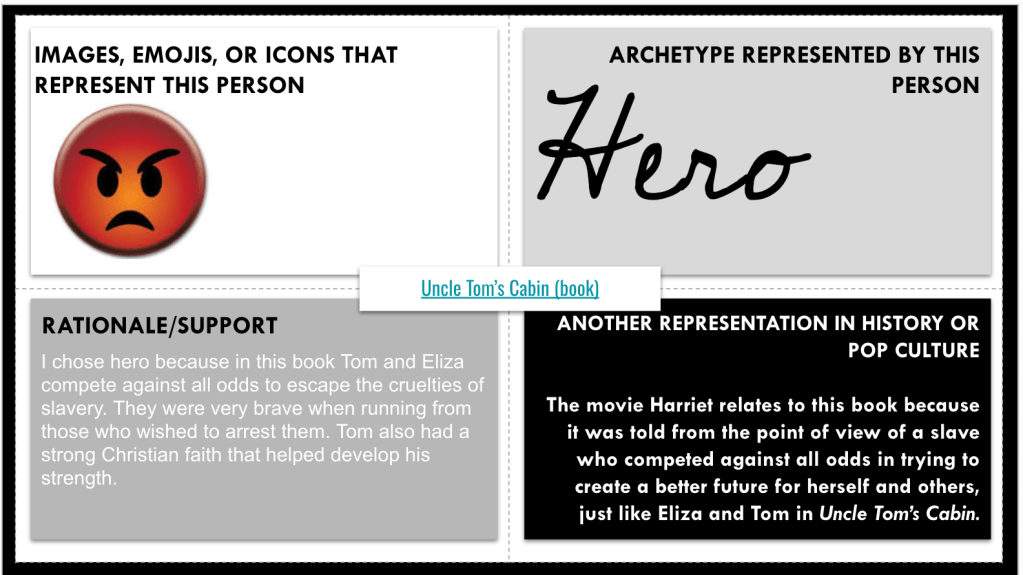
To introduce Uncle Tom’s Cabin, I used an Archetype Foursquare. In the middle of the archetype template, I linked an article about the background, plot, and impact of the novel. Students read through the information and decided which archetype they would apply to the novel and use supporting evidence. At the conclusion, I had students discuss why they chose a certain archetype to describe Uncle Tom’s Cabin.

We ended class with a Fast and Curious EduProtocol. I added some questions to the Gimkit about Uncle Tom’s Cabin. The class averages were down a bit because I added three new questions.

Tuesday

On Tuesday, we dove into a lesson on Uncle Tom’s Cabin. I adapted this lesson from from a textbook that my co-author, Dr. Scott Petri, contributed to – a resource written for schools in Texas that incorporates background information and primary sources to help students learn history.

Monday we had explored the background and significance of Uncle Tom’s Cabin. Tuesday, we focused on three chapters: Chapter 7 – A Mother’s Struggle, Chapter 30 – A Slave Warehouse, and Chapter 33 – Cassy. Students selected a chapter and designed a slide that featured a quote that would anger abolitionists. We then analyzed the quote together and considered how it reflected the harsh realities of slavery.

I was pleased with how engaged and motivated the students were throughout the lesson. By focusing on storytelling techniques and emotional language, Harriet Beecher Stowe created empathy and awareness about the devastating impact of slavery. I added an Annotate and Tell to the lesson with three excerpts from the ending of the book. On the slide, I had students focus on the arguments Stowe put forth against slavery, the audience she was appealing to, and why she would appeal to mothers.

Wednesday and Thursday

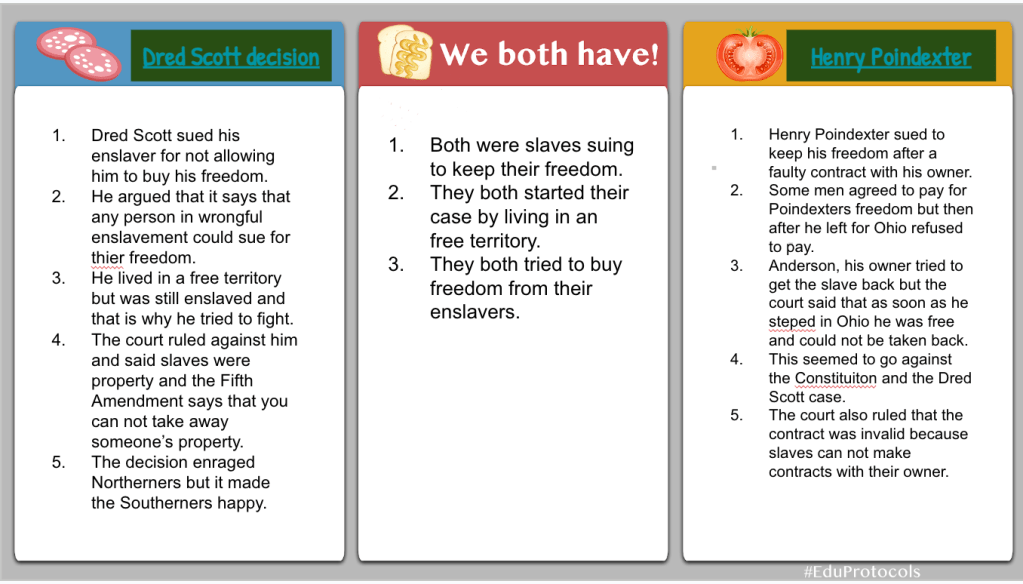
On Wednesday, we began learning about the Dred Scott case. I also use this as an opportunity to tie in some local history about Henry Poindexter who had a similar case in Ohio. As an educator, I always strive to connect historical events to the local context, making them more relatable and meaningful for my students. In this particular lesson, we discovered a remarkable similarity between the Dred Scott case of 1857 and a case involving Henry Poindexter in 1856.

Henry Poindexter signed a promissory note committing to pay $1,000 for his freedom. When his enslaver allowed him to cross the river into Ohio, specifically in New Richmond and Cincinnati, Henry decided not to honor the agreement, arguing that he was now in the free state of Ohio. Subsequently, his enslaver sued him, leading to a legal battle that reached the Ohio Supreme Court. Ultimately, the court ruled in Henry’s favor, declaring him free. This local connection offered a unique opportunity to understand the complexities of the time through a relatable lens.

To deepen our understanding, we engaged in a Cybersandwich activity, comparing the Dred Scott case with Henry Poindexter’s legal battle. Students filled out a Venn diagram, identifying similarities and differences between the two cases. This exercise encouraged critical thinking, analysis, and reflection on the legal implications and consequences of each situation.

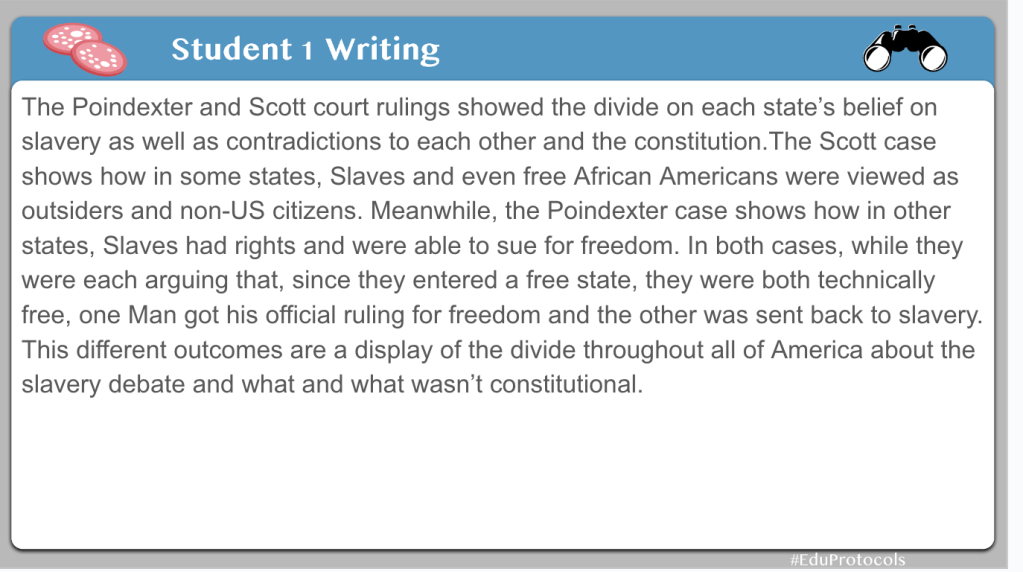
Following the Venn diagram, students composed a compare/contrast text structure to summarize their findings. This exercise not only reinforced their understanding of the cases but also developed their writing skills and ability to articulate complex ideas effectively.

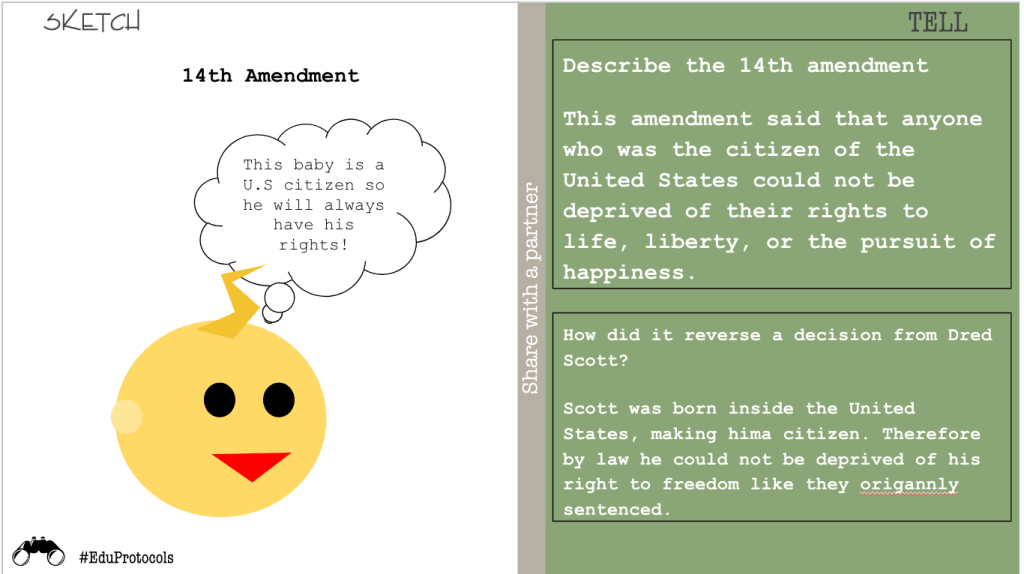
To further our exploration, we connected the Dred Scott case to the 13th and 14th Amendments, which had profound implications for civil rights and the overturning of the infamous decision. Employing a Sketch and Tell activity, students utilized Google Shapes to create visual representations of the 13th and 14th Amendments.

Accompanied by their sketches, students “told” the story of the amendments in their own words, explaining how each amendment played a significant role in nullifying the Dred Scott case decision. This exercise fostered creativity, critical thinking, and a deeper comprehension of the amendments’ impact on the course of history.

Thursday’s lesson was a cool exploration of local history intertwined with national events. By connecting the Dred Scott case to the story of Henry Poindexter, we provided students with a personal connection to a pivotal moment in our nation’s past. Moreover, examining the 13th and 14th Amendments enabled students to comprehend how the legal landscape evolved and how these amendments transformed the rights of individuals.

Friday

Friday I wasn’t at school and had a decision to make – do I post a summative assessment for my unit on the causes of the Civil War? Or, do I add one more lesson on the Election of 1860? The Election of 1860 lesson would be easy to put together and cause less problems – I went with this idea.

For this lesson, I adapted it from Retro Report. I started with this question, “How did the results of the 1860 presidential election show that the United States was becoming more and more divided?”

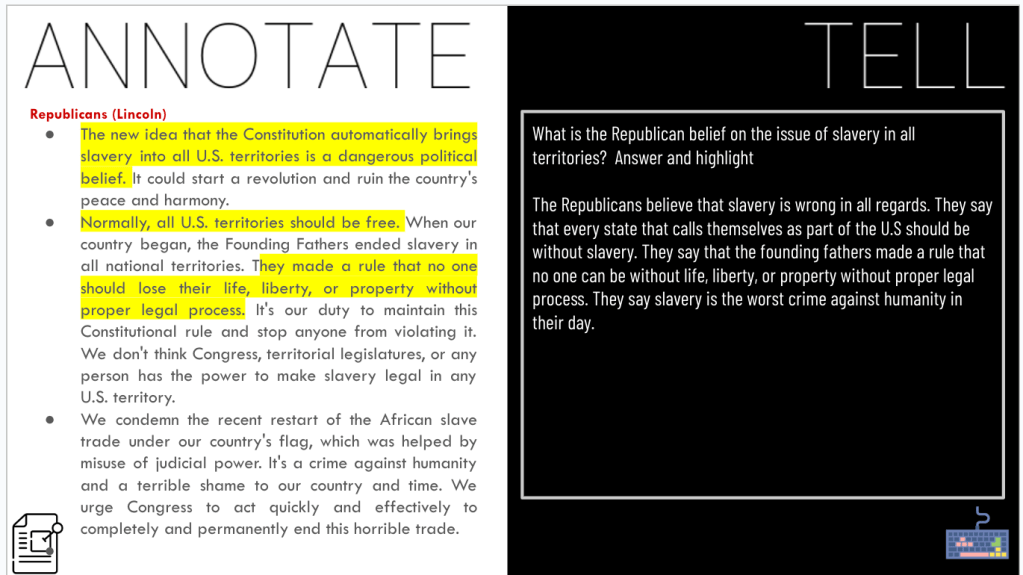
At the end of the lesson, I wanted students to write from the POV of 3 candidates from the Election of 1860. So, I created a 3xPOV template for this lesson. At the beginning of the lesson, I put together a Map and Tell and jhad students analyze a ,ap from the Election of 1860. Next, they watched a video from Retro Report on the election. The they analyzed the platforms of the Northern Democrats, Southern Democrats, and Republicans regarding their stance on slavery. Finally, students ended with the 3xPOV. This was meant to be a one day and they did an awesome job considering I wasn’t present.